VOLVO VNL780 1.21.X
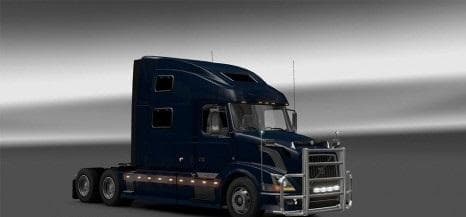
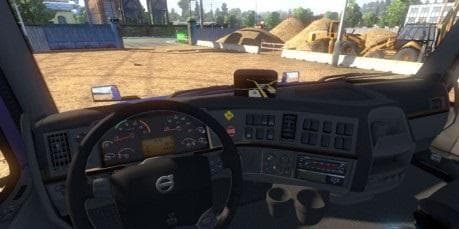
VOLVO VNL780 1.21.X is an ETS2 parts. Listed compatible with ETS2 1.21.
The VOLVO VNL780 1.21.X mod introduces a range of customizable parts for the Volvo VNL 780 truck, tailored for ETS2 version 1.21. This mod enhances your truck's look and feel by adding interior options, tunable components, and accessories like GPS units and handbrake buttons reminiscent of American models. Wheels and front-end upgrades are also part of the package, giving players more control over their vehicle's appearance.
Parts mods like this one typically add various accessories such as bull bars, lights, exhausts, mirrors, and interior items directly in the truck customization menu. Since this mod targets a specific truck model, it integrates smoothly into setups focused on American-style trucks or those favoring Volvo rigs with extra detail.
When incorporating parts mods into your game, it's useful to pay attention to load order to avoid conflicts with other mods altering the same truck or its components. Generally, parts mods load after map and gameplay mods but before any total conversions or heavy script changes. Compatibility is usually straightforward if you stick to mods designed for the same ETS2 version—in this case, 1.21.
This kind of mod fits well in a modded garage where personalization is key. Players who enjoy fine-tuning their trucks beyond just paint jobs will appreciate having access to additional interior elements and exterior tuning pieces that enhance realism and immersion.
Truckers aiming for an American-style Volvo experience will find this particularly interesting because it adds details not found in the base game’s European-focused trucks. The inclusion of handbrake buttons and other interior features helps replicate some unique traits seen on US roads.
Overall, VOLVO VNL780 1.21.X offers a solid extension for those wanting more options on their Volvo VNL 780 within ETS2 version 1.21 setups without having to switch between multiple unrelated mods.
How to install
1. Download the file(s) from the original source linked above. 2. Drop them into `Documents/Euro Truck Simulator 2/mod/`. 3. Enable in Mod Manager and restart the game.
After the mod loads, save your game inside a safe area (parking lot or service) before deciding whether to keep it. If the game refuses to load with the mod enabled, check that all required DLCs are installed and that the supported ETS2 version chips on this page include your installed game patch.
Reviews
No ratings yetNo reviews yet — be the first to rate this mod.





