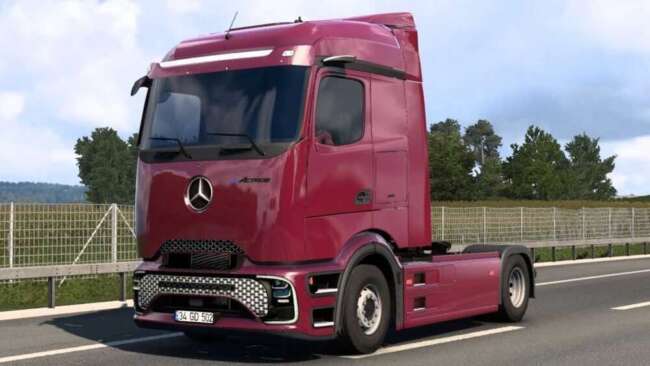
COMIL INVICTUS DD 8×2 VOLVO V1.60

COMIL INVICTUS DD 8×2 VOLVO is an ETS2 parts. Listed compatible with ETS2 1.60.
The COMIL INVICTUS DD 8×2 VOLVO mod is a parts add-on designed for Euro Truck Simulator 2, specifically targeting the Volvo truck models. It enhances both the exterior and interior visuals of your vehicle, featuring detailed elements like a two-tone beige and black interior along with realistic lighting effects that activate at night. The mod also upgrades the instrument panel with a high-quality user interface, improving the in-cabin experience.
Parts mods such as this one typically provide additional customization options within the truck configuration menu. Players can expect new accessories that complement their base vehicles, from aesthetic upgrades to functional enhancements. In this case, the focus lies on refining the cabin ambiance and exterior looks without altering gameplay mechanics.
When integrating parts mods into a broader modded setup, load order considerations are important but often straightforward. Since this mod focuses on visual components for a specific truck type, it generally fits well alongside other body or tuning mods provided they target different aspects or trucks. Conflicts are less common here compared to map or AI traffic mods, but it's wise to check compatibility if you use multiple Volvo-specific add-ons.
This mod is compatible with ETS2 version 1.60, so users running that version will find it works smoothly without needing patches or updates. Those playing on newer versions might encounter issues unless updated versions of the mod become available. The creator listed is ets2mods, a known source for various parts and tuning files.
Players who enjoy personalizing their Volvo trucks beyond standard options will appreciate this mod's attention to detail in both interior design and lighting effects. It suits those who want a more immersive driving experience by enhancing what you see inside and outside your cab during day and night drives.
How to install
1. Download the file(s) from the original source linked above. 2. Drop them into `Documents/Euro Truck Simulator 2/mod/`. 3. Enable in Mod Manager and restart the game.
After the mod loads, save your game inside a safe area (parking lot or service) before deciding whether to keep it. If the game refuses to load with the mod enabled, check that all required DLCs are installed and that the supported ETS2 version chips on this page include your installed game patch.
Reviews
No ratings yetNo reviews yet — be the first to rate this mod.