VOLVO VNL EDIT BY DRAGONMODZ
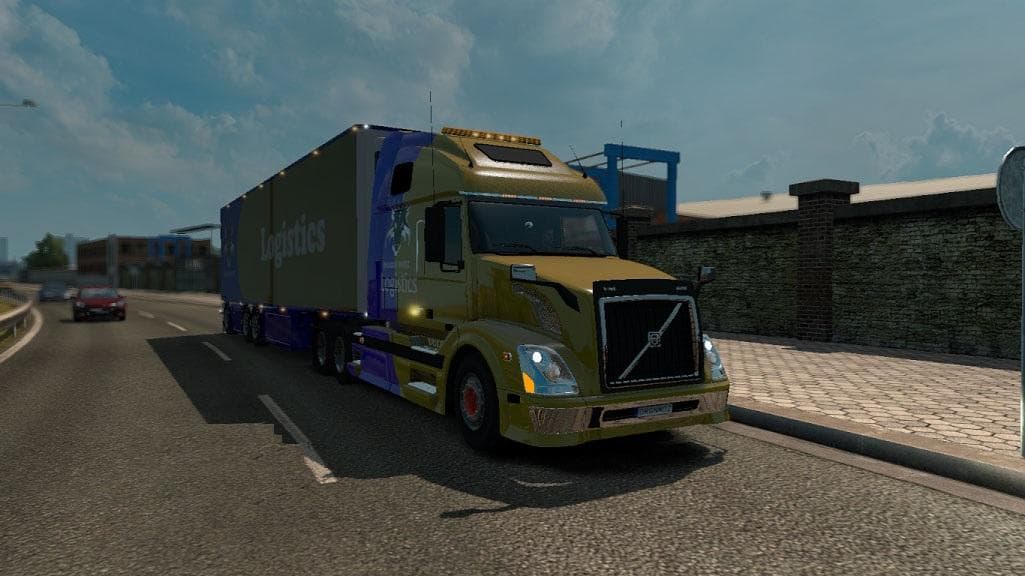
The VOLVO VNL EDIT BY DRAGONMODZ is a parts mod for Euro Truck Simulator 2. It features new lightmask and reverse lights on the chassis, with credits to DragonM
The VOLVO VNL EDIT BY DRAGONMODZ is a parts mod that updates the Volvo VNL truck model in ETS2 by adding new lighting features. It includes a revised lightmask and extra reverse lights mounted on the chassis, enhancing the vehicle's appearance and functionality. This kind of mod focuses on tweaking specific truck components rather than altering gameplay or map elements.
Parts mods like this one are designed to expand customization options for trucks within the game's garage menu. Players can fit various accessories such as lights, mirrors, or bull bars to personalize their rigs. Since this edit targets the Volvo VNL, it fits well for those who prefer driving this American-style truck or want more detail in their fleet.
In a modded ETS2 setup, parts mods typically load after map and gameplay mods but before any total conversions affecting trucks. That helps avoid conflicts where incompatible parts replace each other. While exact compatibility details aren't provided here, these types of lighting upgrades usually work alongside other tuning mods without issues if loaded thoughtfully.
This mod would appeal to players who enjoy fine-tuning their vehicles' look with subtle lighting tweaks. Adding new reverse lights can improve visibility when backing up in dark areas during night drives or challenging deliveries. Truckers aiming for a more realistic or personalized Volvo VNL experience could find this useful.
Because it specifically enhances the Volvo VNL, it's mostly suited for those who frequently use that model and want some fresh visual touches beyond stock options. It’s one of many small but meaningful adjustments available through parts mods that help keep ETS2 feeling fresh over long play sessions.
How to install
1. Download the file(s) from the original source linked above. 2. Drop them into `Documents/Euro Truck Simulator 2/mod/`. 3. Enable in Mod Manager and restart the game.
After the mod loads, save your game inside a safe area (parking lot or service) before deciding whether to keep it. If the game refuses to load with the mod enabled, check that all required DLCs are installed and that the supported ETS2 version chips on this page include your installed game patch.
Reviews
No ratings yetNo reviews yet — be the first to rate this mod.





