VOLVO PACK LIGHT PLUS V 4R2 ALL DLC
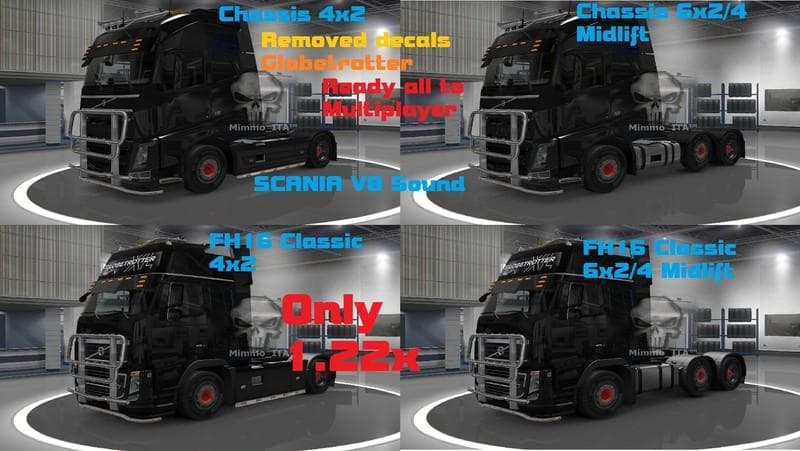
VOLVO PACK LIGHT PLUS V 4R2 ALL DLC is an ETS2 parts.
This mod focuses on the Volvo FH16 trucks, specifically the 2012 models in both 4x2 and 6x2/4 midlift configurations. It removes the usual Globetrotter decals and replaces the front grill with a black version. Interestingly, it swaps out the default sounds for those of a Scania V8, which gives a different audio experience both inside and outside the cabin. All DLCs are supported, so it's compatible with any official content you have installed.
Parts mods like this one are designed to enhance your truck's appearance and sometimes its audio profile by adding or changing specific accessories or components. In ETS2, these mods are accessed through the truck customization menu, allowing you to tweak details such as lights, grills, mirrors, or sounds. This kind of mod is ideal for players who want to give their Volvo FH16 a personalized touch without altering gameplay mechanics.
When fitting parts mods into a modded setup, it's worth remembering that they typically need to be loaded after larger map or gameplay mods but before skin packs if you're using those. Compatibility issues are rare but can happen if multiple mods try to change the same part of a truck. Checking load order ensures that your customizations apply correctly without conflicts.
This particular pack appeals mainly to those who prefer Volvo trucks and enjoy customizing them in detail. The removal of factory decals and addition of a distinctive black grill might suit players aiming for a cleaner or more aggressive look. Plus, swapping out engine sounds for something different adds an extra layer of immersion or variety during long hauls.
Since this mod supports all DLCs officially available for ETS2, it fits smoothly into any updated game version that includes Volvo content. Players running extensive collections of trucks and parts will find this pack complements their collection nicely by expanding tuning options specifically around Volvo FH16 models.
How to install
1. Download the file(s) from the original source linked above. 2. Drop them into `Documents/Euro Truck Simulator 2/mod/`. 3. Enable in Mod Manager and restart the game.
After the mod loads, save your game inside a safe area (parking lot or service) before deciding whether to keep it. If the game refuses to load with the mod enabled, check that all required DLCs are installed and that the supported ETS2 version chips on this page include your installed game patch.
Reviews
No ratings yetNo reviews yet — be the first to rate this mod.





