VOLVO FH6 ALM Mod v1.60
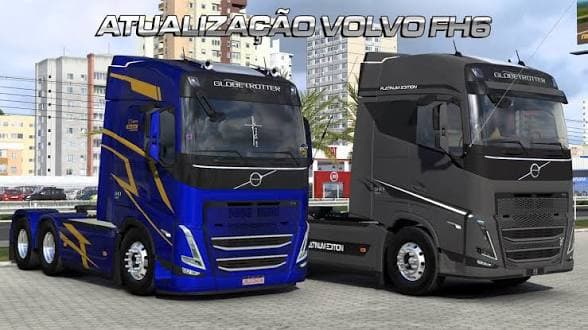
The VOLVO FH6 ALM mod version 1.60 by ets2mods offers a variety of optional parts including bodies, loads, stickers, accessories, and more. Credits go to ALM.Mo
The VOLVO FH6 ALM Mod v1.60 is a parts mod designed for the Volvo FH6 truck model in Euro Truck Simulator 2, compatible with game version 1.60. It adds a variety of accessories and customization options that players can apply through the truck customization menu, offering more ways to personalize their vehicle beyond the stock setup. This includes different body heights, loads, stickers, and other details that enhance the truck’s appearance and style.
Parts mods like this one focus on expanding what you can fit to your trucks. They typically add items such as bull bars, extra lights, unique exhausts, mirrors, or interior upgrades specifically tailored to certain brands or models—in this case, Volvo FH6. These mods let players tweak their trucks in finer detail to match their preferences or roleplay themes.
In a modded ETS2 setup, parts mods often work alongside paint jobs or trailer packs without conflict since they alter separate game data areas. However, load order can matter if multiple parts mods target the same truck model; placing this mod higher might ensure its accessories show up properly without being overridden by others. Compatibility depends mostly on matching the game version and truck base model.
This mod suits players who enjoy customizing their Volvo FH6 with additional gear not found in the base game or want a more unique look while driving across European roads like Germany or France. It’s also useful for those who run several complementary mods and want to maintain visual consistency on this specific truck model.
Installation generally involves placing the mod file into your ETS2 mod folder and enabling it through the in-game mod manager. Since it's made by ets2mods and matches version 1.60 of both ETS2 and the mod itself, it should integrate smoothly if you keep your game updated accordingly.
How to install
1. Download the file(s) from the original source linked above. 2. Drop them into `Documents/Euro Truck Simulator 2/mod/`. 3. Enable in Mod Manager and restart the game.
After the mod loads, save your game inside a safe area (parking lot or service) before deciding whether to keep it. If the game refuses to load with the mod enabled, check that all required DLCs are installed and that the supported ETS2 version chips on this page include your installed game patch.
Reviews
No ratings yetNo reviews yet — be the first to rate this mod.





