VOLVO FH540 2013 V5.0 1.22.Х
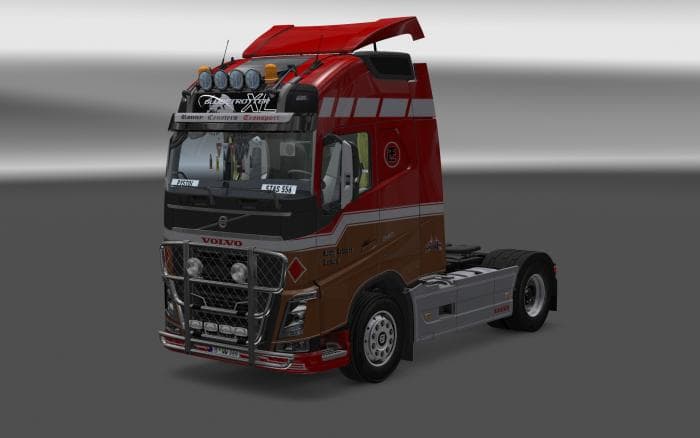
The VOLVO FH540 2013 1.22.Х mod is a parts category mod for ETS2 version 1.22. Created by Euro truck simulator 2, the latest update (v 5.0) includes interior ch
The VOLVO FH540 2013 V5.0 mod is a parts addition designed specifically for the Volvo FH540 truck model in Euro Truck Simulator 2, compatible with game version 1.22. This type of mod generally enhances your truck by adding various accessories that can be customized through the in-game truck customization menu. These accessories might include upgrades like additional lights, mirrors, exhausts, or interior elements, giving players more ways to personalize their vehicles.
Parts mods such as this one usually integrate well into a modded setup focused on truck tuning and customization. Since it targets a specific truck model, it fits naturally alongside other brand or model-specific parts mods without causing conflicts if loaded correctly. Load order matters with these kinds of mods; they typically should be placed after map mods but before any large overhaul packs to ensure all added components display properly.
This particular mod has seen updates that include enhancements to the interior chamber and compatibility additions related to the Cabin Accessories DLC. That suggests it's mindful of integrating official expansions, which can matter if you're running a heavily modded profile with several DLCs active.
Players who enjoy tweaking their trucks for appearance or performance will find value here. It’s especially useful for those who prefer Volvo trucks and want more detailed customization options beyond what’s offered in the base game or official DLCs.
Given its focus on parts for a single truck model and its compatibility with ETS2 version 1.22, this mod suits those who maintain an updated game version and like to keep their setup orderly to avoid conflicts between similar customization mods.
How to install
1. Download the file(s) from the original source linked above. 2. Drop them into `Documents/Euro Truck Simulator 2/mod/`. 3. Enable in Mod Manager and restart the game.
After the mod loads, save your game inside a safe area (parking lot or service) before deciding whether to keep it. If the game refuses to load with the mod enabled, check that all required DLCs are installed and that the supported ETS2 version chips on this page include your installed game patch.
Reviews
No ratings yetNo reviews yet — be the first to rate this mod.





