Volvo FH3 Addon Pack v1.60
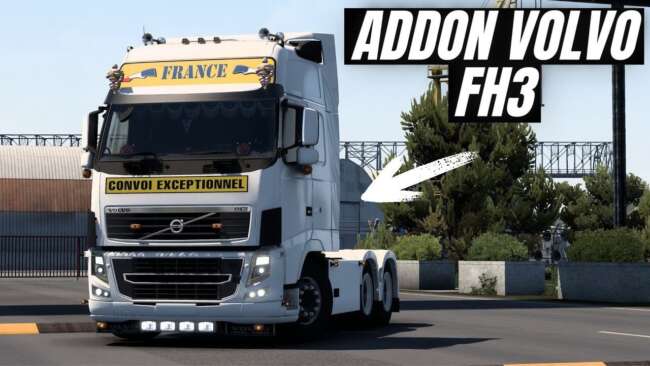
The Volvo FH3 Addon Pack by ets2mods is a parts mod for ETS2 version 1.60, featuring slots for front bumper and roof grill, front mudflaps, new chassis options,
The Volvo FH3 Addon Pack v1.60 is a parts mod designed for Euro Truck Simulator 2, specifically tailored to the Volvo FH3 model. It adds several customization options such as new slots for the front bumper and roof grill, along with front mudflaps and a long 6x4 chassis. You'll also find updates to sideskirts with multiple models and paint options, plus refreshed rear fender paint.
Mods in the parts category like this one allow players to enhance their trucks with additional accessories and cosmetic changes through the customization menu. These modifications don't alter gameplay mechanics but focus on visual and styling improvements, giving your truck a more personalized appearance that stands out on the road.
When used in a modded setup, parts mods generally need to be loaded after any larger truck model replacements to ensure their components appear correctly. Since this pack targets the Volvo FH3 and is compatible with ETS2 version 1.60, it's important to match it with the base game or other mods supporting that same version to avoid conflicts.
Compatibility can sometimes be tricky if you have other tuning packs or addon mods that modify similar parts of the Volvo FH3. It's advisable to check load order preferences within your mod manager, placing this pack where its elements override default features but don't clash with other detailed customizations.
This kind of addon appeals mostly to players who enjoy tweaking their favorite truck model down to finer details. If you're fond of the Volvo FH series and want more variety in accessories like bumpers, grills, mudflaps, or chassis options, this mod provides those extra choices without overhauling your entire vehicle.
Since it focuses purely on parts for one truck model rather than adding new vehicles or gameplay changes, it integrates well into setups where you already have other visual mods installed. It’s a straightforward way to enrich your trucking experience with subtle yet distinct upgrades.
How to install
1. Download the file(s) from the original source linked above. 2. Drop them into `Documents/Euro Truck Simulator 2/mod/`. 3. Enable in Mod Manager and restart the game.
After the mod loads, save your game inside a safe area (parking lot or service) before deciding whether to keep it. If the game refuses to load with the mod enabled, check that all required DLCs are installed and that the supported ETS2 version chips on this page include your installed game patch.
Reviews
No ratings yetNo reviews yet — be the first to rate this mod.





