Volvo FH Classic - ALM.Mods 1.60
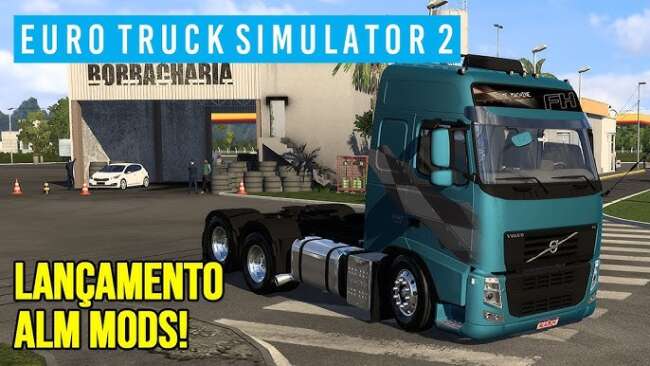
Volvo FH Classic - ALM.Mods 1.60 is an ETS2 parts. Listed compatible with ETS2 1.60.
The Volvo FH Classic - ALM.Mods 1.60 is a parts mod designed specifically for the Volvo FH truck in Euro Truck Simulator 2. It adds a variety of exterior and interior accessories that enhance the truck's appearance and customization options. This includes PX antennas, additional air horns, custom bumpers, spoilers, air deflectors, side skirts, and unique wheels with hubcaps.
Parts mods like this one allow players to modify their trucks beyond the standard options provided by the base game. By fitting these accessories through the truck customization menu, you can tailor your vehicle’s look to match your personal style or roleplay preferences. Mods focused on specific truck models usually blend well with other tuning mods targeting the same brand or model.
In a modded setup, it's common to load parts mods after any general tuning or paint job mods to avoid conflicts and ensure all added components appear correctly on the truck. Compatibility issues are rare when sticking to parts mods from reputable sources that support your ETS2 version—in this case, version 1.60 is supported by this mod.
Truck enthusiasts who enjoy detailed customization will appreciate what this mod brings to their Volvo FH. It offers a range of visual upgrades that make the classic Volvo stand out on roads across Europe within ETS2’s expansive map.
Because it modifies both exterior details like bumpers and wheels as well as interior items, this mod adds depth without altering core gameplay mechanics. It fits nicely into setups aiming for authenticity or just a more personalized driving experience.
Overall, if you're running ETS2 version 1.60 and want more options for upgrading your Volvo FH Classic’s look, this parts mod provides several tasteful accessories that are easy to install through the in-game workshop.
How to install
1. Download the file(s) from the original source linked above. 2. Drop them into `Documents/Euro Truck Simulator 2/mod/`. 3. Enable in Mod Manager and restart the game.
After the mod loads, save your game inside a safe area (parking lot or service) before deciding whether to keep it. If the game refuses to load with the mod enabled, check that all required DLCs are installed and that the supported ETS2 version chips on this page include your installed game patch.
Reviews
No ratings yetNo reviews yet — be the first to rate this mod.





