VOLVO FH 2012 V18.8R BY PENDRAGON
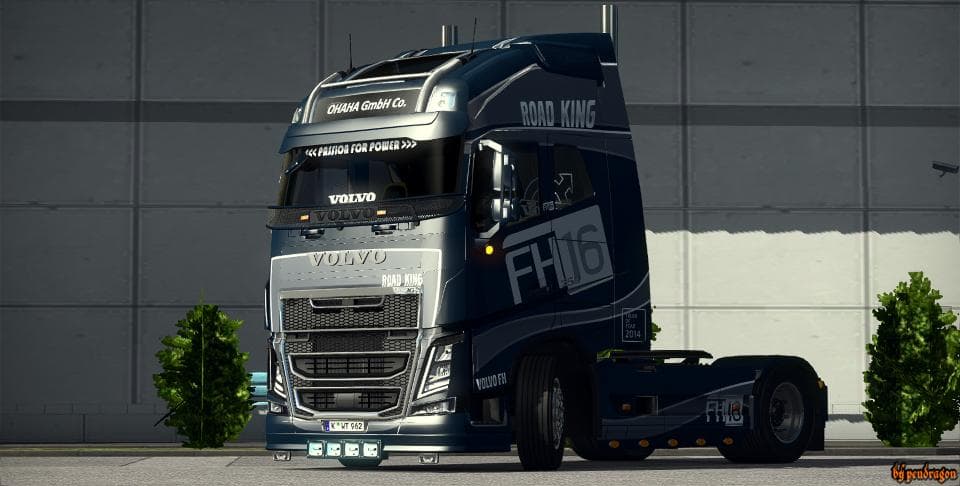
VOLVO FH 2012 V18.8R BY PENDRAGON - ETS2 mods download is an ETS2 parts.
The VOLVO FH 2012 V18.8R BY PENDRAGON mod is a parts upgrade designed for the Volvo FH series in Euro Truck Simulator 2. It builds upon a previous FH16 2012 base, incorporating features from the standalone Volvo FH 2013 version, which suggests an expansion of customization options for this specific truck model. Mods like this one typically add various accessories such as lights, exhausts, mirrors, and interior items that you can fit through the truck customization menu.
Parts mods like this serve to enhance the visual and functional aspects of trucks by providing more choices when tuning or personalizing your vehicle. They often focus on particular brands or models to maintain authenticity and compatibility within the game's ecosystem. Installing these mods usually requires placing them in the mod folder and activating them via the game’s mod manager. Load order can matter if multiple parts mods target the same truck; generally, newer or more comprehensive mods should be loaded last to avoid conflicts.
In a modded setup with other tuning or parts mods, this Volvo parts pack would integrate well if it's compatible with your ETS2 version and other installed mods targeting similar trucks. Since its exact version support is unknown, it might require some trial or checking for updates from the source community to ensure it works smoothly without overriding or breaking existing customizations.
This kind of parts mod appeals mostly to players who favor detailed customization of their Volvo trucks and want to expand beyond the default options offered by ETS2. It’s particularly suited for those who enjoy fine-tuning their rigs visually and functionally, adding unique touches that reflect their preferences while driving across regions like Germany, France, or Sweden where Volvo trucks are common.
How to install
1. Download the file(s) from the original source linked above. 2. Drop them into `Documents/Euro Truck Simulator 2/mod/`. 3. Enable in Mod Manager and restart the game.
After the mod loads, save your game inside a safe area (parking lot or service) before deciding whether to keep it. If the game refuses to load with the mod enabled, check that all required DLCs are installed and that the supported ETS2 version chips on this page include your installed game patch.
Reviews
No ratings yetNo reviews yet — be the first to rate this mod.





