V8K SCANIA MICHELIN WHEELS FOR 1.22+
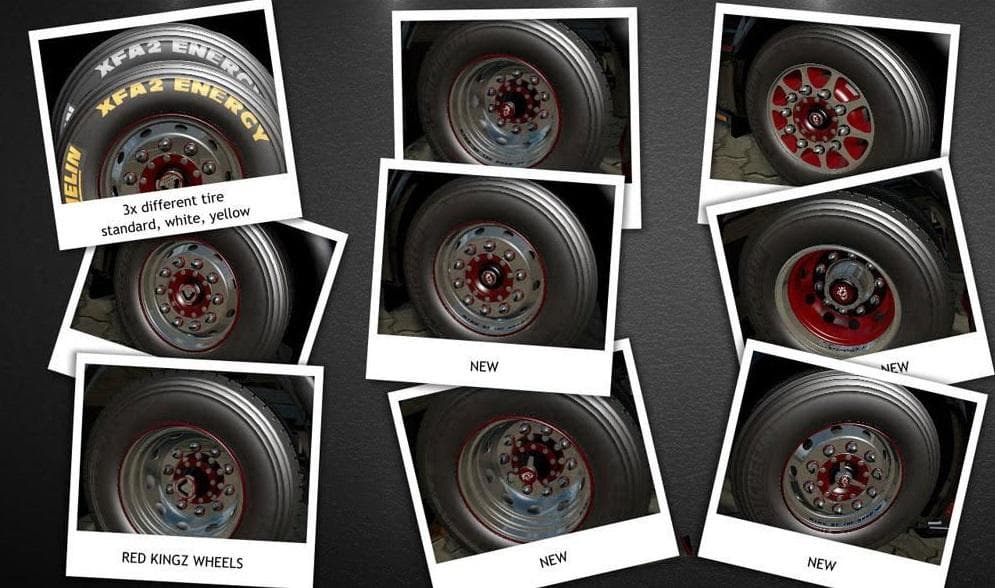
V8K SCANIA MICHELIN WHEELS FOR 1.22+ is a parts mod for ETS2 version 1.22, created by Euro Truck Simulator 2. It includes a pack of Scania Michelin wheels with
The V8K Scania Michelin Wheels mod brings a set of Michelin tires specifically designed for Scania trucks in ETS2 version 1.22 and above. These wheels aim to replicate the look and feel of real-world Michelin XFA2 tires, adding a touch of authenticity to your rig. Mods like this one replace or add parts that can be equipped in the truck customization menu, allowing players to tweak their vehicle's appearance down to details like wheels and tires.
Parts mods such as these fit into the truck tuning category, which lets you personalize your trucks with various accessories including lights, mirrors, exhausts, and wheels. Since this pack targets Scania models exclusively, it’s perfect for drivers who want to maintain brand consistency while upgrading their vehicle's components. The mod is compatible with patch 1.22, so it’s advisable to use it alongside other mods designed for the same game version.
When using parts mods in a heavily modded setup, it's good practice to check load order because some mods might overwrite similar files or assets. Usually, wheel and tire mods should be loaded after any broad texture or skin mods that affect wheels to ensure the correct visuals appear on your truck. This mod’s focus on authentic Michelin tire grading means it should integrate well without conflicting with general tuning packs that don’t alter wheel types.
This kind of mod appeals mostly to players who enjoy fine-tuning their trucks for visual fidelity and realism rather than gameplay changes. If you’re running a Scania fleet or just prefer those trucks, swapping out standard wheels for ones based on real Michelin models adds an extra layer of detail that can make your driving experience more immersive.
How to install
1. Download the file(s) from the original source linked above. 2. Drop them into `Documents/Euro Truck Simulator 2/mod/`. 3. Enable in Mod Manager and restart the game.
After the mod loads, save your game inside a safe area (parking lot or service) before deciding whether to keep it. If the game refuses to load with the mod enabled, check that all required DLCs are installed and that the supported ETS2 version chips on this page include your installed game patch.
Reviews
No ratings yetNo reviews yet — be the first to rate this mod.





