TURKISH ACCESSORIES PACK 1.11
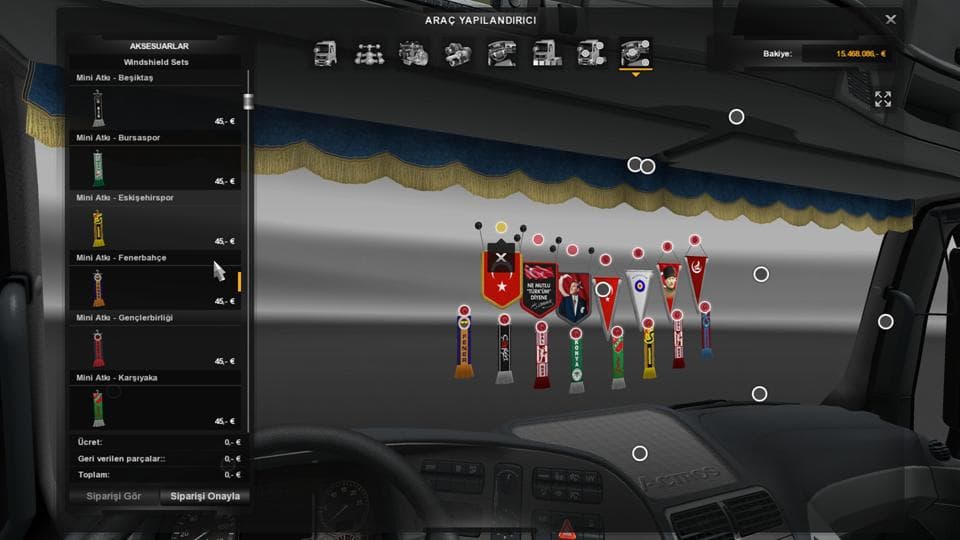
The TURKISH ACCESSORIES PACK 1.11 is a parts mod for ETS2 by Euro Truck Simulator 2. Version 1.11 includes a fix for SCS Dashboard items not appearing, while ve
The TURKISH ACCESSORIES PACK 1.11 is a parts mod designed to add a variety of accessories to your trucks in Euro Truck Simulator 2. This kind of mod typically enhances truck customization by offering extra items like bull bars, lights, mirrors, and interior details that can be fitted through the truck customization menu. It targets players who want to personalize their rigs beyond the default options.
Parts mods such as this one fit into a modded setup by expanding the range of visual and functional options available for trucks. Since they modify components individually, they generally work well alongside other mods including paint jobs or map expansions without major conflicts. However, users should keep an eye on load order when multiple parts mods are involved to avoid overlapping elements or texture issues.
This particular version 1.11 addresses some fixes related to dashboard items from SCS not appearing correctly and includes updates like an activated notebook accessory inside the cabin. These kinds of tweaks help maintain compatibility with ETS2 versions 1.11 and 1.1, ensuring that added accessories display properly without glitches.
For those who enjoy detailed truck tuning, especially with a focus on Turkish-themed or inspired accessories, this pack offers more options to enrich their in-cab experience and external styling. While the creator remains unknown, the mod’s updates show ongoing support for keeping it functional with recent game patches.
Installing parts mods usually involves placing the mod file into the ETS2 mod folder and activating it via the in-game mod manager. Since this pack adds specific dashboard and accessory items, it's wise to test its interaction with other interior or parts mods to confirm everything appears as intended.
How to install
1. Download the file(s) from the original source linked above. 2. Drop them into `Documents/Euro Truck Simulator 2/mod/`. 3. Enable in Mod Manager and restart the game.
After the mod loads, save your game inside a safe area (parking lot or service) before deciding whether to keep it. If the game refuses to load with the mod enabled, check that all required DLCs are installed and that the supported ETS2 version chips on this page include your installed game patch.
Reviews
No ratings yetNo reviews yet — be the first to rate this mod.





