Turkish Accessories Pack
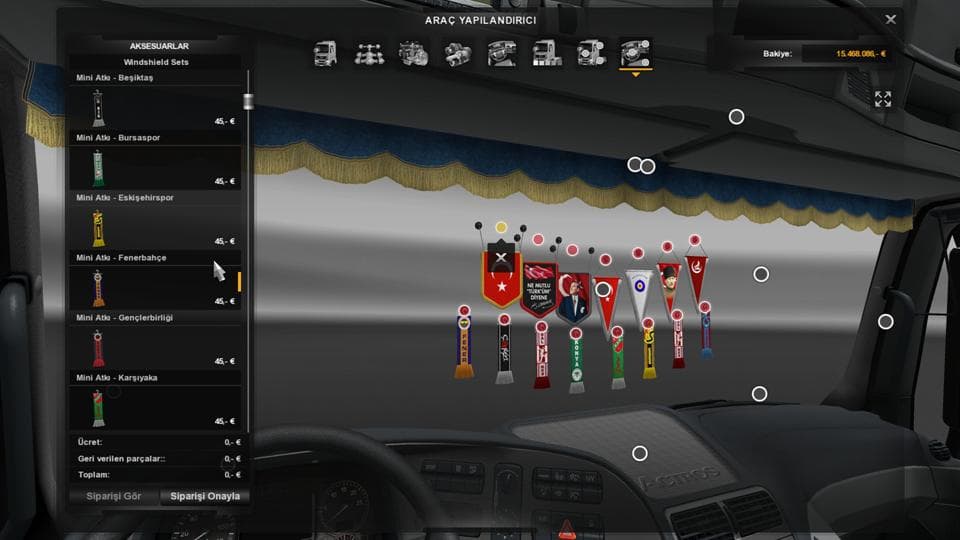
Turkish Accessories Pack by Euro Truck Simulator 2 adds various flags for the Turkish audience, requiring the "Cabin Accessories DLC" to be enabled. It does not
The Turkish Accessories Pack is a parts mod designed for players who want to add a local touch to their trucks in Euro Truck Simulator 2. Specifically aimed at the Turkish audience, this mod introduces various flags that can be attached through the truck customization menu, provided the Cabin Accessories DLC is enabled. It doesn't overwrite existing flags but adds new options to the mix.
Parts mods like this one typically enhance trucks by adding items such as bull bars, lights, mirrors, and interior decorations. In this case, the focus is on flag accessories representing Turkey, allowing for a more personalized and culturally relevant trucking experience. These kinds of mods slot into the parts section of your garage upgrades and are applied via the standard customization interface.
When integrating this pack into a modded setup, it’s important that the Cabin Accessories DLC is active; without it, these additional flags won’t show up. Load order generally isn’t complicated for parts mods like this because they don’t usually conflict with map or gameplay mods. However, if you’re running multiple parts packs targeting similar areas or categories, keeping an eye on compatibility never hurts.
This pack suits players interested in reflecting Turkish pride or simply wanting to diversify their collection of accessories with region-specific content. If you often run mods focused on regional authenticity or enjoy decorating your truck with unique cultural items, this could be a straightforward addition to your setup.
How to install
1. Download the file(s) from the original source linked above. 2. Drop them into `Documents/Euro Truck Simulator 2/mod/`. 3. Enable in Mod Manager and restart the game.
After the mod loads, save your game inside a safe area (parking lot or service) before deciding whether to keep it. If the game refuses to load with the mod enabled, check that all required DLCs are installed and that the supported ETS2 version chips on this page include your installed game patch.
Reviews
No ratings yetNo reviews yet — be the first to rate this mod.





