Tuning Parts for MAN TGX 2020 GX Cab v1.60
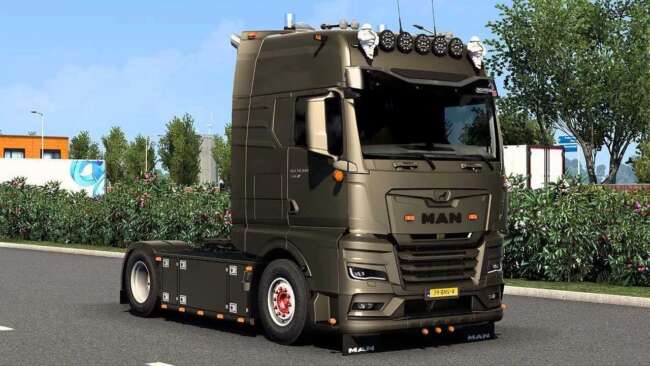
This mod adds various tuning parts for the MAN TGX 2020 GX Cab, including roof grills, bottom grills, front badge, front bumper, and more. Created by ets2mods,
This mod adds a range of tuning parts specifically designed for the MAN TGX 2020 GX Cab in Euro Truck Simulator 2. It includes components like roof grills, bottom grills, front badges, bumpers, and various intake bars and light covers that you can fit through the truck customization menu. These accessories let you personalize your rig beyond the standard options.
Parts mods like this one typically focus on enhancing a single truck model by offering additional cosmetic elements or functional upgrades. They slot directly into the existing customization system, allowing players to tweak their vehicle's appearance to better match their preferences or roleplay scenarios. Since this is a parts mod for ETS2 version 1.60, it should be compatible with setups running the same game version.
In a modded environment, tuning parts are usually placed after any map or gameplay mods in your load order to avoid conflicts, but before other cosmetic mods that might overwrite similar areas. Because it targets just one truck model, it works well alongside broader truck packs or other brand-specific additions without causing issues. Just make sure your game version aligns since compatibility depends on matching ETS2 1.60.
This pack suits players who want to customize their MAN TGX 2020 GX Cab with extra detail and variety in their trucks' external look. It's especially useful if you're running a modded fleet focused on German trucks or prefer having more visual options without altering gameplay balance.
Since these tuning parts come from ets2mods and support ETS2 1.60 specifically, they're straightforward to install and activate via the mod manager. If you’re someone who enjoys fine-tuning your vehicle’s style while keeping things consistent within your existing setup, this could be a good addition.
How to install
1. Download the file(s) from the original source linked above. 2. Drop them into `Documents/Euro Truck Simulator 2/mod/`. 3. Enable in Mod Manager and restart the game.
After the mod loads, save your game inside a safe area (parking lot or service) before deciding whether to keep it. If the game refuses to load with the mod enabled, check that all required DLCs are installed and that the supported ETS2 version chips on this page include your installed game patch.
Reviews
No ratings yetNo reviews yet — be the first to rate this mod.





