Transparent LED Board (tcab)
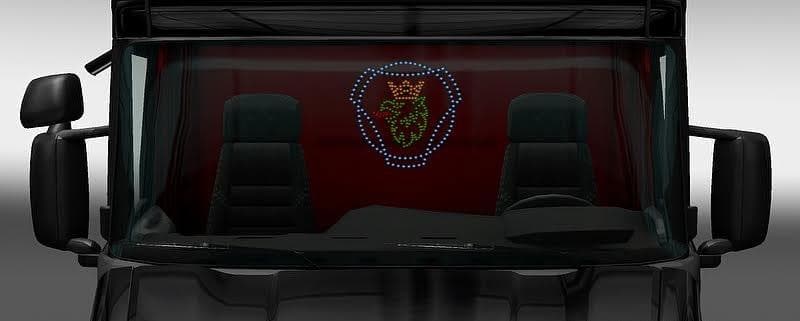
The Transparent LED Board (tcab) is a parts mod for ETS2 version 1.7 created by Euro Truck Simulator 2. It is a modification of the LED Board by RJL without a b
The Transparent LED Board (tcab) is a parts mod designed for Euro Truck Simulator 2, specifically tailored to complement the Scania T Mod version 1.7.1. This mod replaces the standard LED board accessory by removing its black backplate, resulting in a see-through effect that changes the visual style of your truck’s front lighting panel.
Parts mods like this one add detailed accessories to trucks, allowing players to customize their vehicles beyond basic paint jobs and decals. Typically accessed through the truck customization menu, these mods enhance realism or aesthetics by adding or modifying elements such as lights, mirrors, bull bars, or interior items. Since this mod depends on another for proper function, it demonstrates how some parts mods are closely tied to specific truck models and versions.
In terms of installation and compatibility, the Transparent LED Board requires the Scania T Mod v1.7.1 to work correctly and won’t function as intended without it. It can be loaded separately within a modded setup but should be placed accordingly in your mod manager to avoid conflicts with other parts that modify similar areas of the truck.
This type of accessory appeals mainly to players who enjoy fine-tuning their trucks with subtle visual tweaks and want their rigs to stand out with unique details. If you’re running a Scania T setup and prefer a sleeker look on your LED display without additional background elements, this mod fits right in.
Overall, Transparent LED Board (tcab) adds a nuanced variation for those invested in deep customization of their Scania trucks in ETS2 1.7 versions and complements existing mods focused on enhancing truck appearance without altering gameplay.
How to install
1. Download the file(s) from the original source linked above. 2. Drop them into `Documents/Euro Truck Simulator 2/mod/`. 3. Enable in Mod Manager and restart the game.
After the mod loads, save your game inside a safe area (parking lot or service) before deciding whether to keep it. If the game refuses to load with the mod enabled, check that all required DLCs are installed and that the supported ETS2 version chips on this page include your installed game patch.
Reviews
No ratings yetNo reviews yet — be the first to rate this mod.





