Transparent LED Board
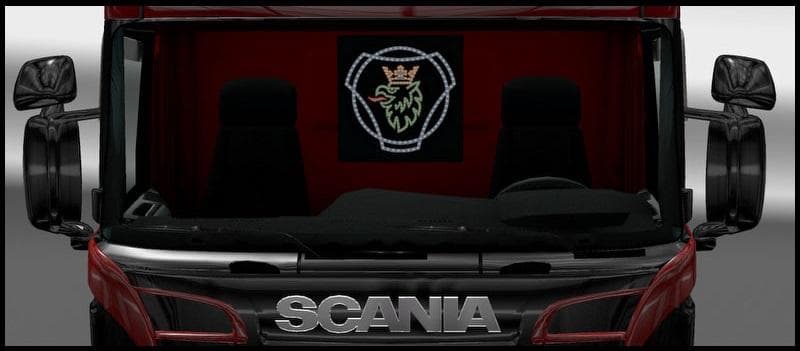
The Transparent LED Board mod by Euro Truck Simulator 2 is a parts mod designed for Scania R & Streamline Modifications v1.4.1. It removes the black backplate f
The Transparent LED Board is a parts mod designed for Euro Truck Simulator 2, specifically tailored to enhance the appearance of Scania R and Streamline trucks. Unlike typical LED boards that come with a black backplate, this mod removes that feature, offering a cleaner and more integrated look on your vehicle's exterior. This subtle change can make a noticeable difference if you're aiming for a distinctive style on your truck without altering its fundamental design.
Parts mods like this one add various accessories to trucks via the customization menu. These include items such as bull bars, lights, mirrors, and interior tweaks. They generally focus on specific truck models or brands—in this case, Scania—allowing players to personalize their rigs beyond what’s available in the base game. Accessories like LED boards are popular because they help bring individuality and detail to your vehicle setup.
To use the Transparent LED Board effectively, it requires the Scania R & Streamline Modifications version 1.4.1 or later, since it depends on that framework to work properly. This means it fits into a modded setup where you already have those base modifications installed. When managing load order, parts mods usually need to be placed after truck model mods they depend on to avoid conflicts or missing assets.
This type of parts mod appeals mostly to players who enjoy fine-tuning their trucks’ aesthetics with subtle but meaningful changes. If you run a heavily modded Scania fleet or just want your single rig to stand out a bit more in ETS2 version 1.4 environments, this transparent LED board offers an alternative look without drastic overhaul.
In short, if you’re looking for small details that improve your Scania’s visual appeal while staying compatible with existing Scania truck mods, this accessory fits right in. It's especially relevant for those focused on realistic customization and maintaining harmony within their mod collections.
How to install
1. Download the file(s) from the original source linked above. 2. Drop them into `Documents/Euro Truck Simulator 2/mod/`. 3. Enable in Mod Manager and restart the game.
After the mod loads, save your game inside a safe area (parking lot or service) before deciding whether to keep it. If the game refuses to load with the mod enabled, check that all required DLCs are installed and that the supported ETS2 version chips on this page include your installed game patch.
Reviews
No ratings yetNo reviews yet — be the first to rate this mod.





