TRANSPARENT GPS ROUTE
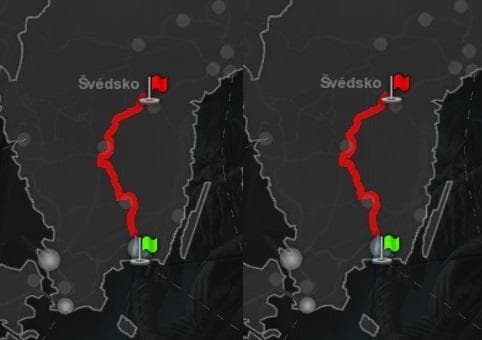
TRANSPARENT GPS ROUTE - ETS2 mods download is an ETS2 parts.
The TRANSPARENT GPS ROUTE mod is a parts modification for Euro Truck Simulator 2 that adjusts the appearance of the in-game GPS route display. Instead of altering gameplay mechanics or truck performance, this mod focuses on visual customization within the truck's dashboard interface. Parts mods like this one usually add or tweak accessories and interior elements to enhance the player's personal setup.
In ETS2, parts mods are accessed through the truck customization menu where you can install various items such as mirrors, lights, and interior decorations. This particular mod fits into that category by modifying an existing element — the GPS route — making it more visually subtle by increasing transparency. This can reduce screen clutter and improve visibility while driving.
When it comes to integrating a transparent GPS route mod with other modifications, it's generally compatible since it only affects visual aspects inside the cabin. However, as with many parts mods, users should be mindful of load order if combining several mods that alter dashboard components to avoid conflicts or display issues.
Players who prefer a cleaner cockpit view or want less distraction from navigation aids might find this mod helpful. It's especially useful for those who rely on external navigation tools or simply want a different aesthetic without changing core gameplay elements.
While details like supported ETS2 versions or file size are unknown, installing parts mods typically involves placing files in the correct mod folder and activating them via the game's Mod Manager. Since this is an accessory-type mod affecting interior visuals, it's relatively straightforward to use alongside other content additions.
Overall, TRANSPARENT GPS ROUTE offers a small but potentially welcome tweak for players looking to customize their truck interiors with minimal impact on game functionality.
How to install
1. Download the file(s) from the original source linked above. 2. Drop them into `Documents/Euro Truck Simulator 2/mod/`. 3. Enable in Mod Manager and restart the game.
After the mod loads, save your game inside a safe area (parking lot or service) before deciding whether to keep it. If the game refuses to load with the mod enabled, check that all required DLCs are installed and that the supported ETS2 version chips on this page include your installed game patch.
Reviews
No ratings yetNo reviews yet — be the first to rate this mod.





