Tires & Rims Asanti
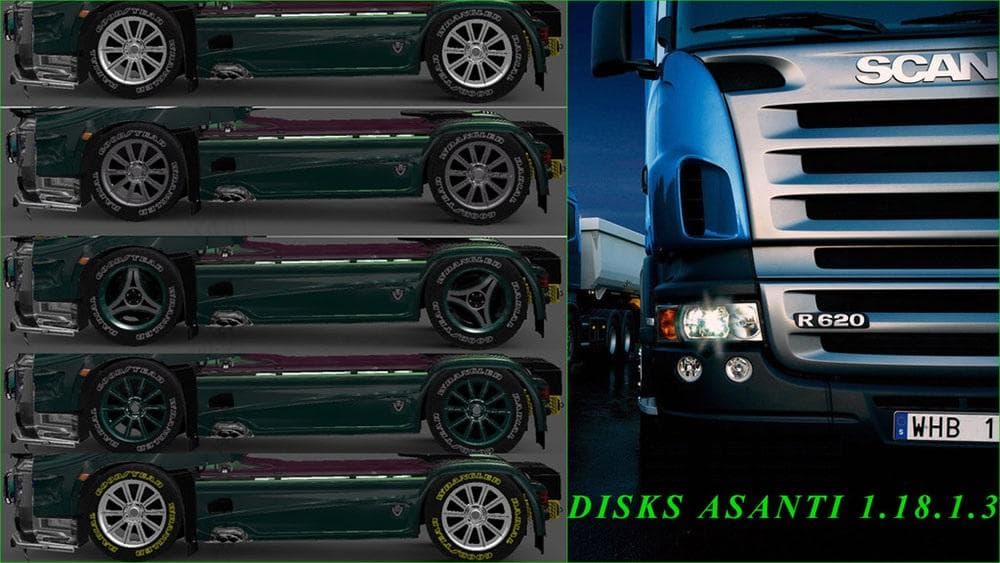
Tires & Rims Asanti is a parts mod for Euro Truck Simulator 2, offering a selection of Asanti-branded wheels and rims. This kind of mod enhances the truck customization options by adding new wheel designs that players can fit in the garage menu. Mods like this focus on cosmetic upgrades that let you personalize your vehicle beyond the stock choices.
Parts mods in ETS2 generally provide additional accessories such as lights, bull bars, or rims to tailor your truck’s appearance. Tires & Rims Asanti fits right into this category by expanding the variety of wheel options available to players, often appealing to those who want their trucks to stand out visually on the road.
When it comes to modded setups, parts mods like these usually slot in without conflicting with gameplay or map expansions. Still, it’s worth keeping an eye on load order if you have several tuning mods installed, as some may replace or override similar parts. Since Tires & Rims Asanti was tested on version 1.18.3s, it's compatible with ETS2 version 1.18 and should work fine alongside other tuning packs made for this update.
Truck enthusiasts who enjoy detailed customization will likely appreciate this mod because it offers a fresh look for their rig’s wheels. It complements other visual enhancements well and helps add personality to any truck model that supports aftermarket wheels.
Installing parts mods typically involves placing the file in your mod folder and activating it via the game’s mod manager before launching ETS2. Once enabled, these new tires and rims appear alongside factory options when customizing your vehicle in the garage.
This mod doesn't change gameplay mechanics but improves aesthetics by providing additional design choices. It's a straightforward way for players focused on style to enhance their trucking experience without affecting performance.
How to install
1. Download the file(s) from the original source linked above. 2. Drop them into `Documents/Euro Truck Simulator 2/mod/`. 3. Enable in Mod Manager and restart the game.
After the mod loads, save your game inside a safe area (parking lot or service) before deciding whether to keep it. If the game refuses to load with the mod enabled, check that all required DLCs are installed and that the supported ETS2 version chips on this page include your installed game patch.
Reviews
No ratings yetNo reviews yet — be the first to rate this mod.





