Seat Adjustments No Limits v1.60
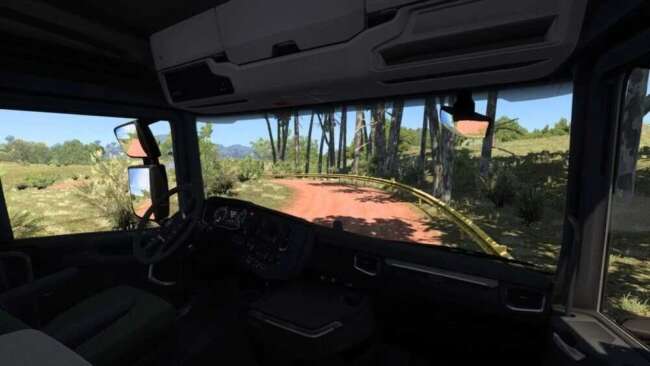
Seat Adjustments No Limits is a parts mod by ets2mods for ETS2 version 1.60. It removes seat movement limits, enabling players to adjust their camera position f
Seat Adjustments No Limits v1.60 is a parts mod for Euro Truck Simulator 2 that removes the standard restrictions on moving the driver's seat inside the cabin. This means you can adjust your in-cabin camera position far beyond what the base game allows, giving you more freedom to find a comfortable or personalized view while driving.
Parts mods like this one typically enhance customization options by adding or modifying components within trucks. In this case, instead of adding physical accessories like bull bars or lights, it changes how you interact with the interior space of your vehicle. The mod integrates into the truck customization menu where many tuning and accessory choices are made.
When setting up a modded ETS2 profile, seat adjustment mods generally fit well alongside other cabin or visual enhancement mods. Since it affects internal camera limits rather than external truck parts, it usually has minimal compatibility issues. However, it's always wise to load it after other cabin-related mods to avoid conflicts in camera controls or settings.
This kind of mod appeals mainly to players who spend long hours behind the wheel and want more control over their viewing angles inside different truck cabins. It can also benefit those who use multiple trucks and prefer adjusting seat positions to suit each model's interior layout for better immersion.
Version 1.60 is designed specifically for ETS2 version 1.60, so ensuring your game matches this will prevent potential errors. The creator, ets2mods, focuses on simple but practical quality-of-life improvements like this one that improve gameplay comfort without drastically altering visuals or performance.
How to install
1. Download the file(s) from the original source linked above. 2. Drop them into `Documents/Euro Truck Simulator 2/mod/`. 3. Enable in Mod Manager and restart the game.
After the mod loads, save your game inside a safe area (parking lot or service) before deciding whether to keep it. If the game refuses to load with the mod enabled, check that all required DLCs are installed and that the supported ETS2 version chips on this page include your installed game patch.
Reviews
No ratings yetNo reviews yet — be the first to rate this mod.





