SCAR - Super Compact Route Advisor v1.60
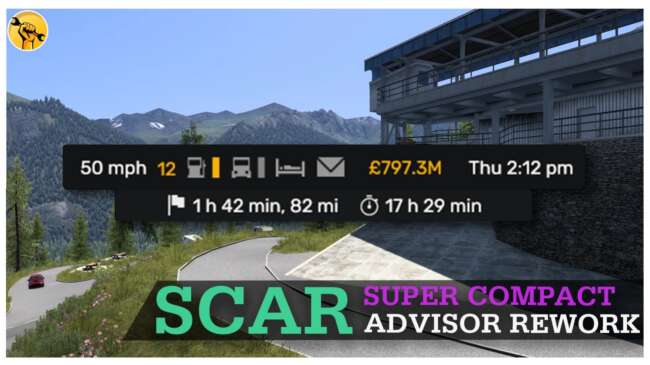
SCAR - Super Compact Route Advisor is an ETS2 parts. Listed compatible with ETS2 1.60.
The SCAR - Super Compact Route Advisor mod for ETS2 streamlines the in-game Route Advisor by replacing it with a more minimalistic version. Instead of the usual comprehensive display, this mod pares down the interface to just the essential info needed during your drives. It’s designed for players who prefer less screen clutter and want a cleaner HUD experience while trucking through various European or American landscapes.
Mods that alter parts like this one typically slot into the truck customization menu, allowing you to tailor small but significant elements of your cab’s setup. While most parts mods focus on physical accessories such as lights or exhausts, this particular mod targets an interface element, which can help reduce distractions without changing your truck's performance or appearance.
In a modded ETS2 environment, something like SCAR fits well alongside map expansions and realism tweaks since it keeps navigation information concise and easy to glance at. Because it's tied to game version 1.60, compatibility depends on using ETS2 1.60 as well, so make sure your base game matches to avoid any conflicts or glitches related to UI changes.
Load order for parts mods that affect gameplay interfaces generally shouldn’t cause issues with other types of mods like maps or trucks. Still, it’s wise to place interface or UI mods after larger content packs if you use multiple mods that touch on navigation or HUD elements to ensure the smallest display is maintained.
This mod will appeal primarily to those who value simplicity in their trucking experience. If you find the default Route Advisor too bulky or distracting, SCAR offers a pared-down alternative that keeps your focus on driving rather than sifting through excess info. It suits both casual drivers and players running highly customized setups looking for clean visuals.
How to install
1. Download the file(s) from the original source linked above. 2. Drop them into `Documents/Euro Truck Simulator 2/mod/`. 3. Enable in Mod Manager and restart the game.
After the mod loads, save your game inside a safe area (parking lot or service) before deciding whether to keep it. If the game refuses to load with the mod enabled, check that all required DLCs are installed and that the supported ETS2 version chips on this page include your installed game patch.
Reviews
No ratings yetNo reviews yet — be the first to rate this mod.





