SCANIA T730 V8 1.22.X
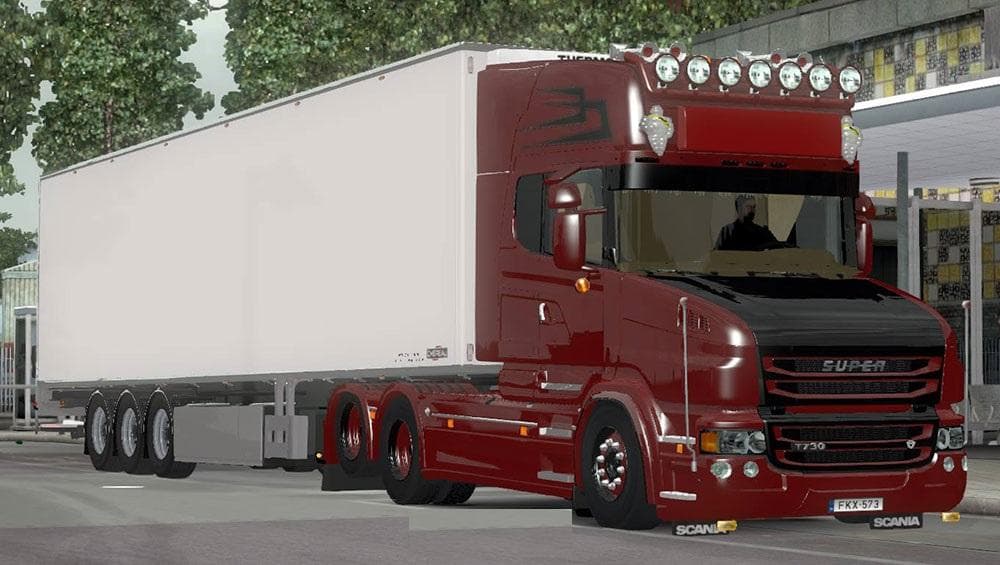
The SCANIA T730 V8 1.22.X mod offers detailed parts for Euro Truck Simulator 2, tested on versions 1.20 and 1.22.x. Created by Euro truck simulator 2, the mod f
The SCANIA T730 V8 1.22.X mod brings a detailed parts pack tailored for the Scania T730 truck model in Euro Truck Simulator 2. It focuses on adding or enhancing accessories like lights, exhausts, mirrors, and other customization options available in the truck's tuning menu. This type of mod typically appeals to players wanting to personalize their trucks beyond what the base game offers.
Parts mods like this one are designed to expand the visual and functional customization possibilities within ETS2. They usually slot directly into the existing truck configuration screens, allowing users to mix and match components easily. Since this mod targets a specific truck model, it fits naturally into setups where players want authenticity or want to replicate real-world variants of the Scania T730.
Compatibility-wise, this mod supports ETS2 versions 1.20 and 1.22, so it's suited for players running those or close patches. When using multiple parts mods, it's wise to consider load order as later-loaded mods might override earlier ones. Typically, parts mods don't conflict heavily unless they alter the same components on a given truck model.
Players who enjoy fine-tuning their vehicle's appearance or want more variety when customizing their Scania trucks will find this mod useful. It's especially relevant for those who drive routes across European regions like Germany or France where Scania trucks are common sights.
Installing parts mods usually involves placing them in the game's mod folder and activating them through the ETS2 mod manager interface. Ensuring that you have matching game versions can prevent crashes or graphical glitches with detailed models such as this one.
How to install
1. Download the file(s) from the original source linked above. 2. Drop them into `Documents/Euro Truck Simulator 2/mod/`. 3. Enable in Mod Manager and restart the game.
After the mod loads, save your game inside a safe area (parking lot or service) before deciding whether to keep it. If the game refuses to load with the mod enabled, check that all required DLCs are installed and that the supported ETS2 version chips on this page include your installed game patch.
Reviews
No ratings yetNo reviews yet — be the first to rate this mod.





