Scania Realistic Retarder & Engine Brake
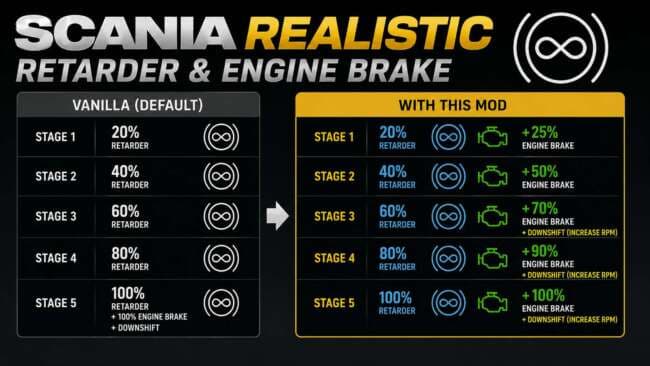
The Scania Realistic Retarder & Engine Brake mod by ets2mods enhances the behavior of the Scania retarder and engine brake in a more realistic and progressive m
The Scania Realistic Retarder & Engine Brake mod changes how the retarder and engine brake work on Scania trucks, making their behavior more gradual and true-to-life. Instead of the default settings, this mod introduces a more nuanced response, which affects how you control your truck's speed on descents or during slowing down. It’s aimed at players who want a driving experience that better matches real-world physics for these specific braking systems.
Mods in the parts category like this one add or modify truck components through the customization menu. They often focus on particular brands or models—in this case, Scania—and adjust functional elements rather than purely visual ones. Parts mods usually slot into your setup alongside other tuning additions such as bull bars or exhausts, complementing both gameplay and aesthetics depending on what you choose to install.
When using mods that alter core truck functions like brakes or retarders, load order can be important to avoid conflicts with other similar tuning mods. This mod supports ETS2 version 1.60, so compatibility with that or nearby versions is expected but users should watch for updates if running newer game versions. Generally, these parts mods work well when placed after larger map or AI traffic mods to ensure smooth integration.
Drivers who favor a realistic simulation feel will likely appreciate this mod’s approach to braking dynamics on Scanias. It's especially useful for those who spend a lot of time hauling heavy loads through varied terrain where precise speed control is critical. By improving how engine braking behaves, it adds another layer of depth to long-haul journeys across European regions such as Germany, France, and beyond.
How to install
1. Download the file(s) from the original source linked above. 2. Drop them into `Documents/Euro Truck Simulator 2/mod/`. 3. Enable in Mod Manager and restart the game.
After the mod loads, save your game inside a safe area (parking lot or service) before deciding whether to keep it. If the game refuses to load with the mod enabled, check that all required DLCs are installed and that the supported ETS2 version chips on this page include your installed game patch.
Reviews
No ratings yetNo reviews yet — be the first to rate this mod.





