SCANIA R730 A.A.V.D.HEUVEL 1.22.X
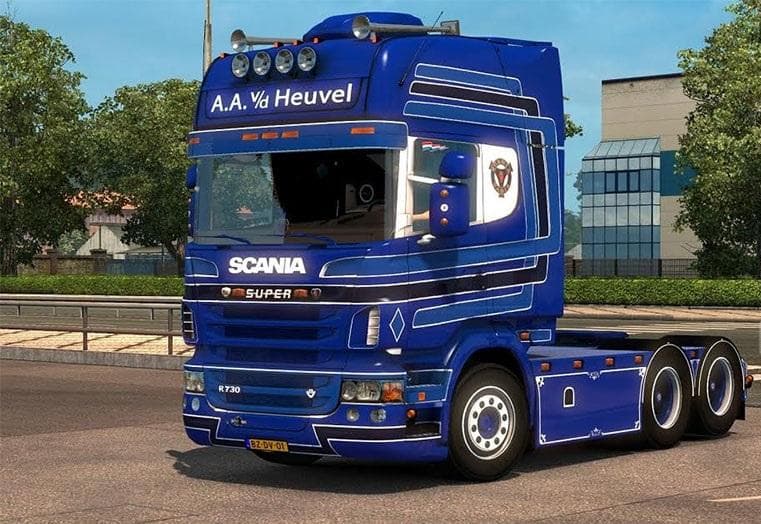
The SCANIA R730 A.A.V.D.HEUVEL 1.22.X mod is a parts mod for ETS2 version 1.22. It includes interior, wheels, and is standalone. Credits to Molotov and Jon-Ruda
The SCANIA R730 A.A.V.D.HEUVEL 1.22.X mod adds a variety of parts and customization options specifically for the Scania R730 truck model in Euro Truck Simulator 2. This includes standalone features such as interior elements and wheels, which can be accessed through the truck customization menu once the mod is installed. Parts mods like this one focus on enhancing or changing visual details of particular trucks rather than altering gameplay mechanics or map areas.
In ETS2, parts mods are designed to give players more control over their truck’s appearance and sometimes its functionality by adding accessories like bull bars, lights, exhaust pipes, mirrors, and interior decorations. Since this mod targets the Scania R730 model, it fits neatly into setups where players want to customize their favorite Scania trucks with authentic or unique components. It works with version 1.22 of ETS2, so compatibility depends on matching your game version accordingly.
When using parts mods, it's common practice to manage load order carefully to avoid conflicts with other tuning or paint job mods that modify the same truck model. Standalone mods generally don't overwrite base game files but might conflict if multiple mods try to change identical parts. Checking compatibility notes or testing in a controlled setup helps ensure smooth integration within a modded profile.
This mod will appeal mainly to players who enjoy detailed truck customization and want more options for their Scania R730 rigs. Those who frequently run tuning mods or create themed fleets could find value in expanding their visual choices without affecting core gameplay elements. Since creator information isn’t listed, users should back up their profiles before applying any changes.
How to install
1. Download the file(s) from the original source linked above. 2. Drop them into `Documents/Euro Truck Simulator 2/mod/`. 3. Enable in Mod Manager and restart the game.
After the mod loads, save your game inside a safe area (parking lot or service) before deciding whether to keep it. If the game refuses to load with the mod enabled, check that all required DLCs are installed and that the supported ETS2 version chips on this page include your installed game patch.
Reviews
No ratings yetNo reviews yet — be the first to rate this mod.





