SCANIA R2009 HIGHLINE SPOILERS 1.21.X
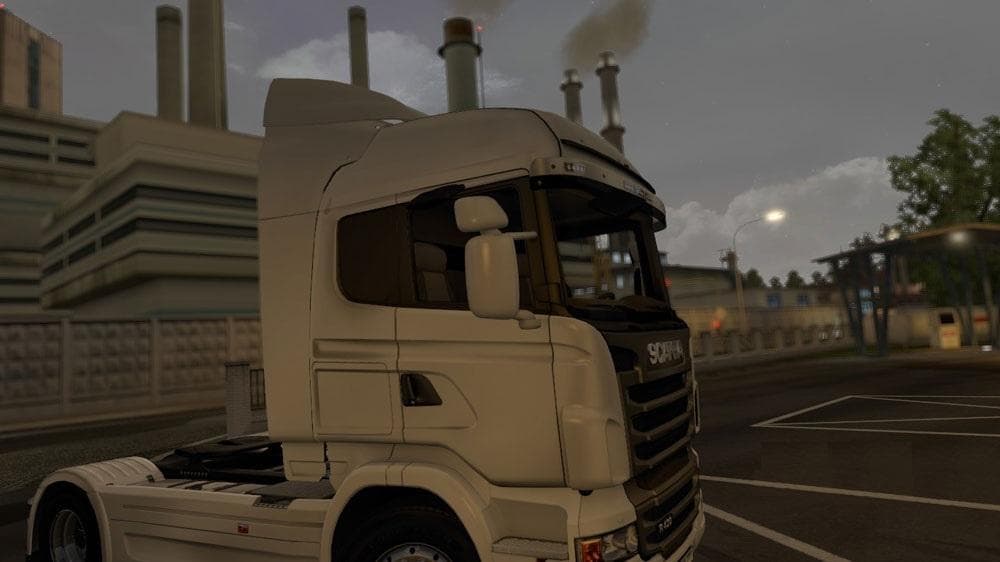
This mod adds spoilers for the Scania R2009 Highline truck in Euro Truck Simulator 2 version 1.21. Use the Streamline Highline template for the skin. Created by
This mod adds spoilers specifically designed for the Scania R2009 Highline truck model in Euro Truck Simulator 2. It fits onto the truck using the Streamline Highline template, making it compatible with skins that use this design. Spoilers like these are part of parts mods that allow players to customize their trucks with additional accessories, enhancing the vehicle's appearance and sometimes its profile.
Parts and tuning mods such as this one expand the customization options available in ETS2’s truck workshop menu. They often focus on a particular brand or model—in this case, Scania's R2009 Highline—allowing users to personalize their trucks beyond what the base game offers. These modifications are installed through the game's mod manager and must be enabled before launching ETS2.
When adding parts mods like these spoilers to a modded setup, it's wise to check compatibility with other visual or tuning mods targeting the same truck model. Load order can be important since later mods may override textures or configurations from earlier ones. Placing parts mods after general skin packs usually ensures proper display.
Players who enjoy detailed truck customization and want to give their Scania R2009 Highline a unique look will appreciate this mod. It's suitable for those running version 1.21 of ETS2 since it matches that update cycle. The mod's focus on spoilers complements other visual enhancements you might have installed for your Scania fleet.
While creator details and file size aren't specified, such parts mods typically have minimal impact on game performance but can significantly change your truck's style. Using this spoiler mod alongside compatible skins and other accessories helps create a cohesive appearance for your rig.
How to install
1. Download the file(s) from the original source linked above. 2. Drop them into `Documents/Euro Truck Simulator 2/mod/`. 3. Enable in Mod Manager and restart the game.
After the mod loads, save your game inside a safe area (parking lot or service) before deciding whether to keep it. If the game refuses to load with the mod enabled, check that all required DLCs are installed and that the supported ETS2 version chips on this page include your installed game patch.
Reviews
No ratings yetNo reviews yet — be the first to rate this mod.





