SCANIA R LOW DECK V1.0
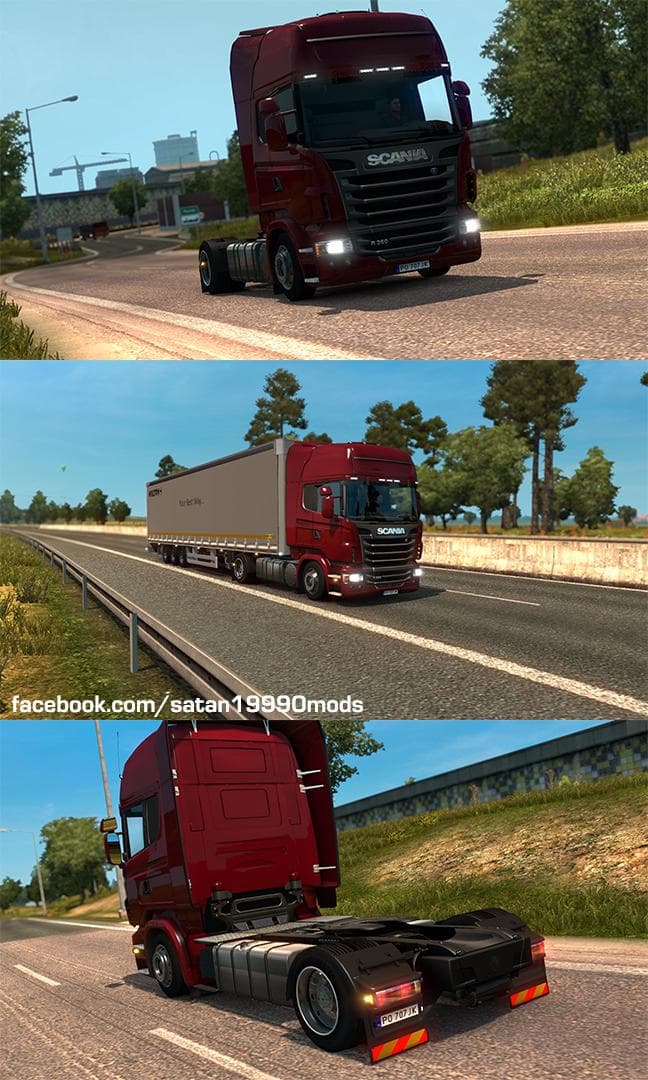
The SCANIA R LOW DECK mod version 1.0 adds a low deck chassis and cabs for Scania R, along with low deck wheels. Tested and working on ETS2 versions 1.0 and 1.2
The SCANIA R LOW DECK V1.0 mod introduces a low deck chassis and corresponding cabs specifically for the Scania R model, along with low deck wheels. This modification provides an alternative setup that isn't available in the base game, letting players customize their truck's appearance and functionality beyond standard options. It has been tested to work on ETS2 versions 1.0 through 1.22, which covers a broad range of older game releases.
Parts mods like this one typically add specialized components—such as chassis types, lighting, mirrors, or interior items—that can be selected from the truck customization menu. They allow players to tailor their vehicle's look and sometimes its performance characteristics according to personal preference or roleplay style. Since this mod focuses on the Scania R model, it caters directly to fans who enjoy driving that brand and want more variety in their builds.
In a modded ETS2 setup, parts mods usually load alongside other visual or gameplay enhancements without conflicts, but load order can matter when multiple mods alter the same truck parts or models. It's a good idea to place this mod after any general Scania tuning packs to ensure its unique low deck chassis and wheels display correctly. Compatibility is generally straightforward for parts mods unless overlapping with another Scania-specific chassis mod.
This mod suits players who prefer detailed truck customization and want their Scania R to stand out with a different chassis height and wheel configuration. Those exploring older ETS2 versions around 1.0 to 1.22 might find this especially useful since it’s confirmed compatible there. If you enjoy fine-tuning your rig's visuals or trying out niche setups, adding a low deck option could enhance your driving experience.
How to install
1. Download the file(s) from the original source linked above. 2. Drop them into `Documents/Euro Truck Simulator 2/mod/`. 3. Enable in Mod Manager and restart the game.
After the mod loads, save your game inside a safe area (parking lot or service) before deciding whether to keep it. If the game refuses to load with the mod enabled, check that all required DLCs are installed and that the supported ETS2 version chips on this page include your installed game patch.
Reviews
No ratings yetNo reviews yet — be the first to rate this mod.





