Scania NG Improved Dashboard v1.60
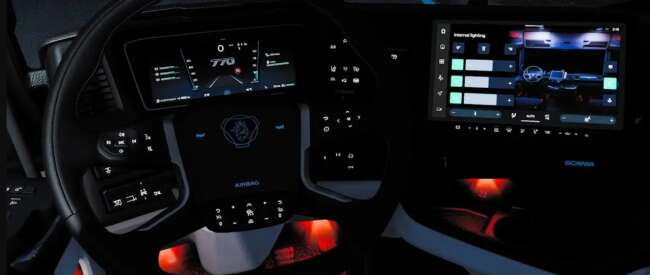
The Scania NG Improved Dashboard mod version 1.60 by ets2mods adds various new features such as an odometer, low beam icon, blind spot indicators, and truck/tra
The Scania NG Improved Dashboard mod updates the interior display of the Scania Next Generation trucks in ETS2 version 1.60. This parts mod enhances the dashboard by adding useful indicators such as an odometer in the notifications tab, low beam icon, blind spot signals for left and right sides, and axle indicators for both truck and trailer. These features bring a more detailed and functional feel to the cockpit experience without altering gameplay mechanics.
Parts mods like this one generally add or improve accessories within the truck customization menu, focusing on specific truck models or brands. They often enhance visual or informational aspects inside the cab, making driving more immersive for those who spend a lot of time behind the wheel in ETS2. Since this mod is tailored for Scania NG trucks, it fits well into setups that already use related Scania tuning or parts packs.
When integrating parts mods into your game, it's wise to pay attention to load order. Mods affecting interiors should load after any general tuning packs to ensure their changes are visible without being overwritten. The Scania NG Improved Dashboard is compatible with ETS2 version 1.60 but may not work properly with newer game versions due to updates in game files and UI elements.
Players who enjoy fine-tuning their truck's interior will appreciate this mod's subtle yet practical additions. It’s especially suited for those who prefer realistic driving conditions where tracking indicators like blind spots and axles can help manage complex maneuvers with trailers. This mod adds depth without cluttering the dashboard, maintaining a clean look while improving information access.
Since it’s developed by ets2mods and designed specifically for a popular truck model, users running a modded Scania fleet might find this dashboard improvement enhances immersion during long hauls across various European regions covered by their preferred map mods.
How to install
1. Download the file(s) from the original source linked above. 2. Drop them into `Documents/Euro Truck Simulator 2/mod/`. 3. Enable in Mod Manager and restart the game.
After the mod loads, save your game inside a safe area (parking lot or service) before deciding whether to keep it. If the game refuses to load with the mod enabled, check that all required DLCs are installed and that the supported ETS2 version chips on this page include your installed game patch.
Reviews
No ratings yetNo reviews yet — be the first to rate this mod.





