Scania NG Addons Pack v1.60
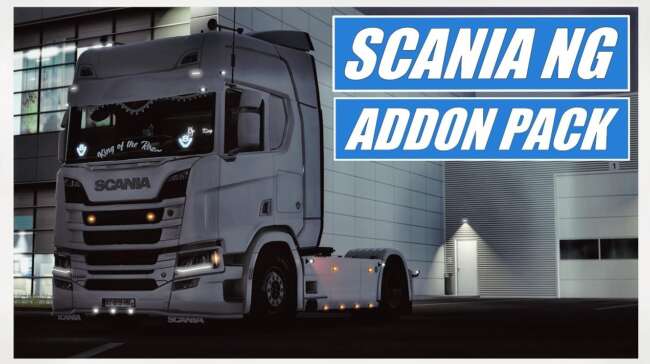
The Scania NG Addons Pack by ets2mods offers side skirts, front bumpers, mirrors with antennas, and painted lightbars for Scania trucks in ETS2 version 1.60. Th
The Scania NG Addons Pack v1.60 is a parts mod designed specifically for the Scania Next Generation trucks in Euro Truck Simulator 2. It expands the customization options by adding various accessories such as side skirts with extra slots, front bumpers equipped with fog lights, multiple mirror styles featuring antennas, and painted lightbars mounted on the roof. These additions allow players to personalize their vehicles beyond what the base game offers.
Parts mods like this one enhance truck customization by introducing new components that can be fitted through the in-game truck configurator. They usually focus on particular brands or models, providing targeted upgrades that complement existing tuning options. This pack fits into that category by catering to fans of Scania NG trucks who want more variety in their visual and functional setups.
When integrating parts mods into a modded ETS2 setup, it's wise to pay attention to load order to avoid conflicts. Typically, parts packs should be loaded after any large map or gameplay mods but before skins and sound mods to ensure proper display and function of accessories. Since this pack targets version 1.60 of both ETS2 and the mod itself, compatibility is streamlined for those running that specific game release.
Players who enjoy detailed truck customization or who focus their gameplay around Scania vehicles will find this add-on useful. It enhances immersion by giving more control over the look and feel of the truck’s exterior elements, making each rig stand out on European roads from Spain to Sweden and beyond.
Overall, this mod suits those wanting to expand their visual options for Scania NG trucks without altering core gameplay mechanics. Its emphasis on realistic accessory placement aligns well with typical tuning practices in ETS2 communities.
Installing the Scania NG Addons Pack is straightforward: drop it into your mod folder and activate it via the game's mod manager alongside other compatible content.
How to install
1. Download the file(s) from the original source linked above. 2. Drop them into `Documents/Euro Truck Simulator 2/mod/`. 3. Enable in Mod Manager and restart the game.
After the mod loads, save your game inside a safe area (parking lot or service) before deciding whether to keep it. If the game refuses to load with the mod enabled, check that all required DLCs are installed and that the supported ETS2 version chips on this page include your installed game patch.
Reviews
No ratings yetNo reviews yet — be the first to rate this mod.





