SCANIA LONGLINE V1.6
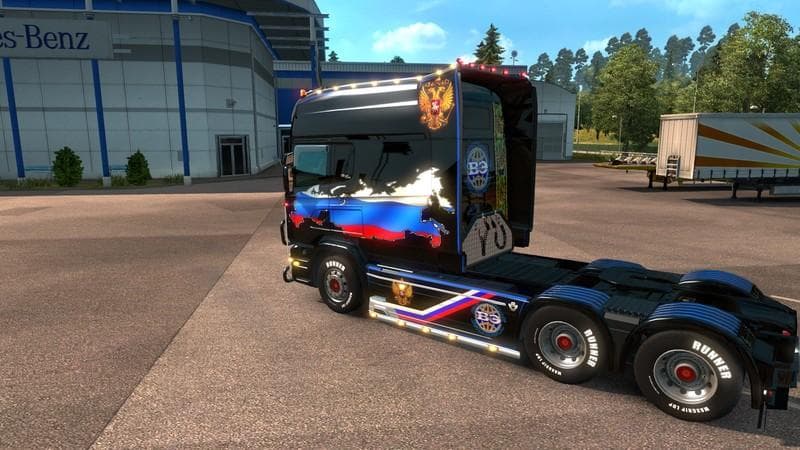
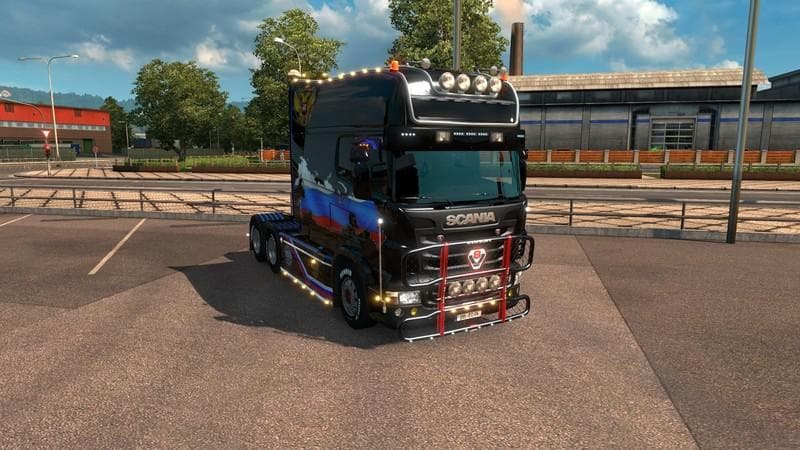
The SCANIA LONGLINE mod version 1.6 for ETS2 offers a reworked version of the default Scania truck with a variety of tuning parts. Created by Euro truck simulat
The SCANIA LONGLINE V1.6 mod offers a modified take on the default Scania truck model found in Euro Truck Simulator 2, focusing on the Streamline version. It introduces a variety of tuning parts, giving players more options to customize their truck's appearance and functionality beyond what the base game provides. These kinds of mods are typically installed through the game's mod manager and activated via the truck customization menu.
Parts mods like this one add a range of accessories such as bull bars, extra lights, exhaust systems, mirrors, and interior details. They are designed to fit specific truck models or brands—in this case, Scania—allowing for a more personalized driving experience. Because it builds on the default Scania Streamline model, it blends well with other mods that enhance or alter Scania trucks without requiring complex load order adjustments.
When using parts mods such as SCANIA LONGLINE V1.6 alongside other vehicle or tuning mods, it's good practice to check compatibility if multiple mods modify similar components. Generally, these types of mods slot into the customization process smoothly but might conflict with others that overhaul the same parts or textures. Players often experiment with load order to ensure visual elements appear correctly.
This mod fits nicely into setups aiming for detailed and realistic truck customization. Fans of Scania vehicles who want more tuning options than those provided by default will find it useful. It's especially relevant for those playing ETS2 version 1.6, aligning with that era’s game files and features.
Overall, SCANIA LONGLINE V1.6 is for players who enjoy fine-tuning their rigs and want additional aesthetic and functional options specifically tailored to Scania trucks. It helps expand personalization in Euro Truck Simulator 2 without drastically changing gameplay mechanics.
How to install
1. Download the file(s) from the original source linked above. 2. Drop them into `Documents/Euro Truck Simulator 2/mod/`. 3. Enable in Mod Manager and restart the game.
After the mod loads, save your game inside a safe area (parking lot or service) before deciding whether to keep it. If the game refuses to load with the mod enabled, check that all required DLCs are installed and that the supported ETS2 version chips on this page include your installed game patch.
Reviews
No ratings yetNo reviews yet — be the first to rate this mod.





