ROKMODS REAL TIRES 1.22.X
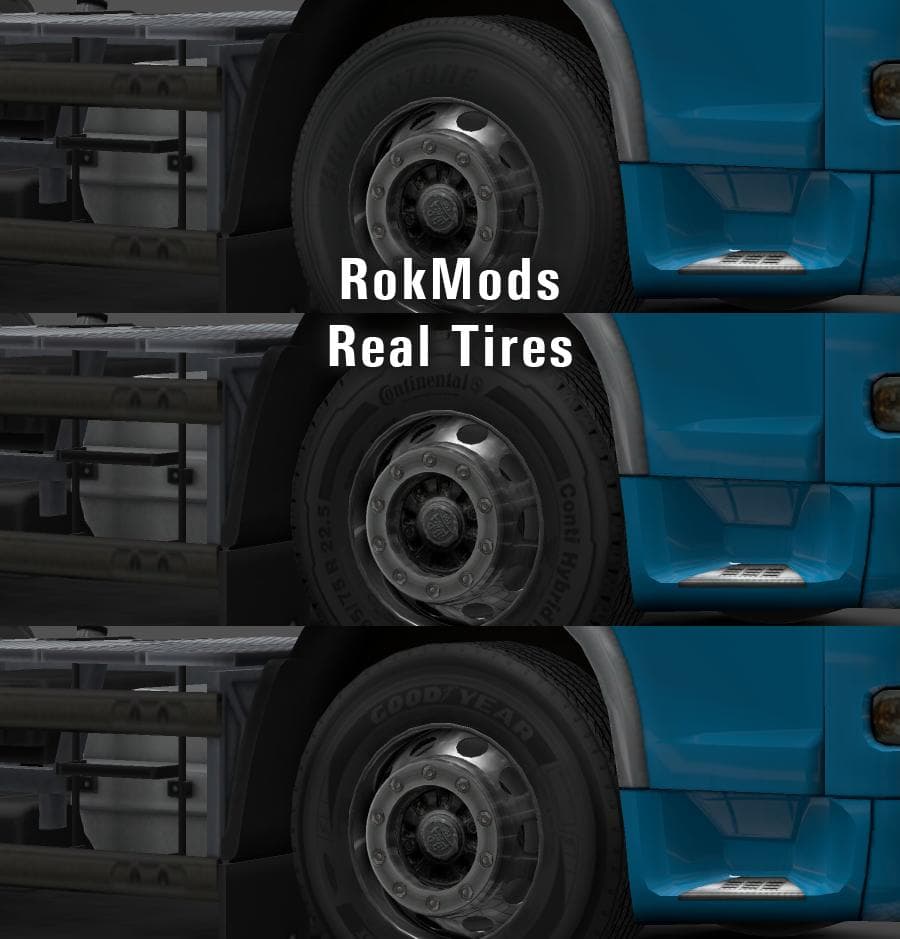
ROKMODS REAL TIRES 1.22.X is a parts mod for ETS2 version 1.22 by Euro Truck Simulator 2. It updates textures for Trailmaster Bridgestone and Elemental Continen
ROKMODS REAL TIRES 1.22.X updates the tire textures for certain brands within Euro Truck Simulator 2, specifically targeting textures like Trailmaster Bridgestone and Elemental Continental. This mod focuses solely on parts, which means it changes how some truck components look rather than adding new vehicles or maps. In ETS2, parts mods like this one are applied through the truck customization menu, allowing players to swap out default elements with more detailed or different-looking alternatives.
Parts mods are designed to enhance the visual experience without altering gameplay mechanics. They fit well into a modded setup that already includes various cosmetic enhancements or tuning packs. Since ROKMODS REAL TIRES is a texture replacement for tires, it usually loads after other mods affecting the same components to ensure its visuals take precedence. Keeping an eye on load order is advisable when mixing multiple parts mods targeting similar truck features.
This mod supports ETS2 version 1.22, so it should be compatible with other mods made for the same game release. Because tire texture replacements don’t typically conflict with large-scale map or truck mods, it can be added without major compatibility issues. However, users should still verify that no other tire-related texture mods overlap to avoid visual glitches.
Players who want a subtle but clear change in how their trucks' tires look will find this mod useful. It’s particularly suitable for those who enjoy customizing their trucks beyond just paint jobs or accessories by refining smaller details like tire appearances. If you prefer a more authentic or distinct look for your wheels during your driving sessions across regions such as Germany, France, or Poland, this mod fits right in.
How to install
1. Download the file(s) from the original source linked above. 2. Drop them into `Documents/Euro Truck Simulator 2/mod/`. 3. Enable in Mod Manager and restart the game.
After the mod loads, save your game inside a safe area (parking lot or service) before deciding whether to keep it. If the game refuses to load with the mod enabled, check that all required DLCs are installed and that the supported ETS2 version chips on this page include your installed game patch.
Reviews
No ratings yetNo reviews yet — be the first to rate this mod.





