ROKMODS MAN DISPLAY 1.22
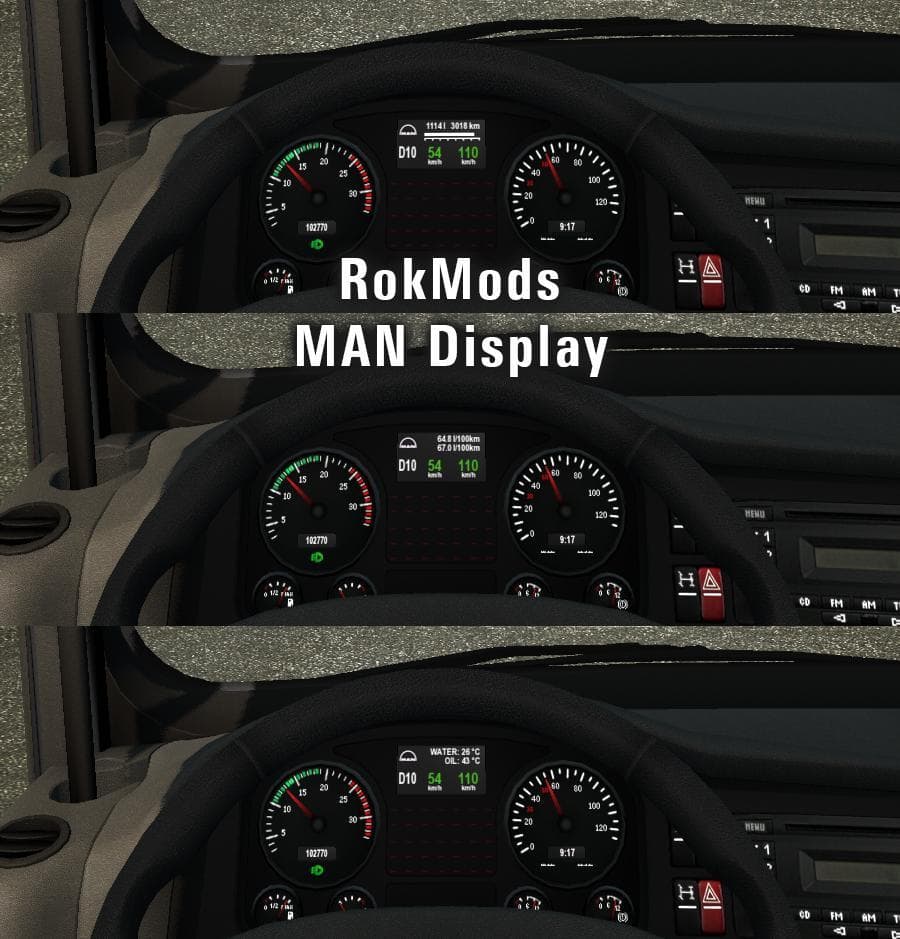
ROKMODS MAN DISPLAY 1.22 is a parts mod for ETS2 version 1.22, created by Euro truck simulator 2. It is a standalone display previously part of RokMods MAN Dash
ROKMODS MAN DISPLAY 1.22 is a parts mod for Euro Truck Simulator 2, designed specifically for the MAN TGX trucks. It was originally part of the now-discontinued RokMods MAN Dashboard but has been split off as a standalone addition. This mod focuses on enhancing the truck's dashboard display, adding to the customization options available within the game’s truck tuning menu.
Parts mods like this one allow players to add various accessories and tweaks to their trucks, ranging from exterior items like bull bars and lights to interior upgrades such as new dashboard elements. In this case, the mod targets the MAN TGX series, including versions like SCS Software's TGX and MADster’s TGX 2.0, offering a more personalized in-cabin experience.
When using parts mods, it's important to consider compatibility and load order. Since this mod is specifically tested with certain MAN TGX variants, it fits well into setups that already include those trucks or compatible mods. Players should ensure they are running ETS2 version 1.22 for proper functionality since version mismatches can lead to issues or missing features.
In a modded setup, these sorts of dashboard or interior parts enhance immersion by providing more detailed or realistic cabin environments. They won't affect gameplay mechanics directly but contribute to the overall visual and thematic customization that many ETS2 players appreciate.
Truck enthusiasts who prefer driving MAN TGX models will find this mod useful if they want extra detail in their dashboards without changing other truck aspects. It suits those who enjoy tweaking their rig's look inside and out while sticking closely to official content versions.
Since the creator is unknown and file size details aren't provided, users should approach installation cautiously and back up profiles before adding any new parts mods. Generally, installing involves placing files in the mod folder and activating them through the game's Mod Manager.
How to install
1. Download the file(s) from the original source linked above. 2. Drop them into `Documents/Euro Truck Simulator 2/mod/`. 3. Enable in Mod Manager and restart the game.
After the mod loads, save your game inside a safe area (parking lot or service) before deciding whether to keep it. If the game refuses to load with the mod enabled, check that all required DLCs are installed and that the supported ETS2 version chips on this page include your installed game patch.
Reviews
No ratings yetNo reviews yet — be the first to rate this mod.





