RJL'S SCANIA T & SCANIA R ACCESSORIES REMOLED V8 R3.1
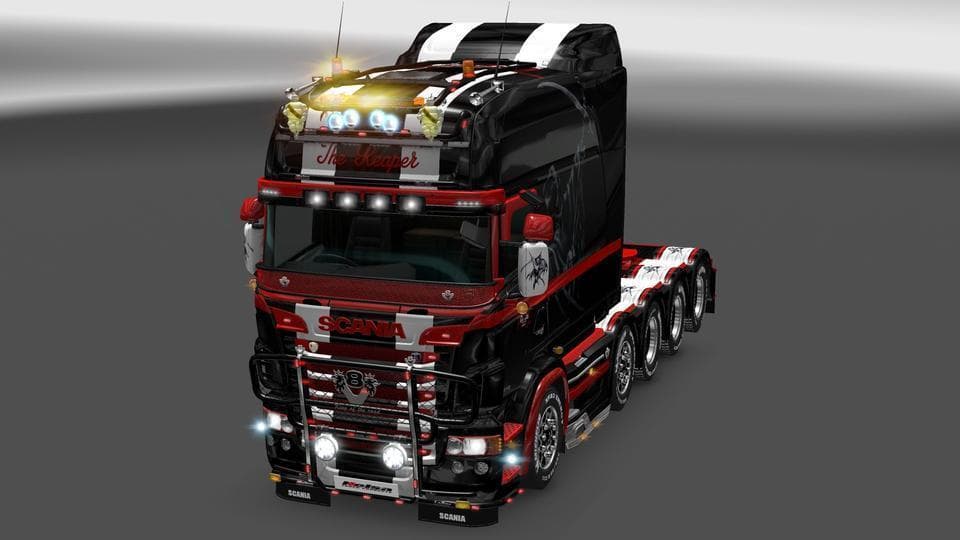
RJL'S SCANIA T & SCANIA R ACCESSORIES REMOLED V8 R3.1 is a parts mod for ETS2 by Euro truck simulator 2. The latest update, R3.1, includes changes to Lobars and
RJL'S SCANIA T & SCANIA R ACCESSORIES REMOLED V8 R3.1 is a parts mod designed specifically for Scania trucks in Euro Truck Simulator 2. It updates and adjusts accessory options like lobars by removing certain plates and includes fixes such as the Twitchfix patch. Mods in this category typically add various visual or functional accessories—things like bull bars, extra lights, mirrors, or interior enhancements—that players can install via the truck customization menu to personalize their vehicle.
Parts mods like this one fit neatly into a modded setup by focusing on enhancing a particular truck brand, in this case Scania’s T and R series. They usually don't conflict with map or gameplay mods but require careful load order placement relative to other truck parts or tuning mods to avoid overwriting changes. Players should load parts mods after any general tuning packs to ensure accessory changes apply correctly.
Because this mod targets Scania trucks exclusively, it appeals mostly to players who favor that manufacturer and want more detailed customization beyond what the base game offers. It’s especially useful for those who enjoy tweaking their rig’s appearance and making subtle adjustments to accessories without altering core gameplay mechanics.
Compatibility tends to be straightforward for parts mods of this type since they mainly modify visual elements tied to specific trucks. However, users should still be mindful of version differences between ETS2 itself and their mod collection to prevent any potential issues with missing or mismatched assets.
Overall, if you’re running a Scania-focused setup in ETS2 and enjoy fine-tuning your truck’s look with custom accessories, RJL’S SCANIA T & SCANIA R ACCESSORIES REMOLED offers an option worth exploring within that niche.
How to install
1. Download the file(s) from the original source linked above. 2. Drop them into `Documents/Euro Truck Simulator 2/mod/`. 3. Enable in Mod Manager and restart the game.
After the mod loads, save your game inside a safe area (parking lot or service) before deciding whether to keep it. If the game refuses to load with the mod enabled, check that all required DLCs are installed and that the supported ETS2 version chips on this page include your installed game patch.
Reviews
No ratings yetNo reviews yet — be the first to rate this mod.





