PIVA DASHBOARD FOR VOLVO FH16
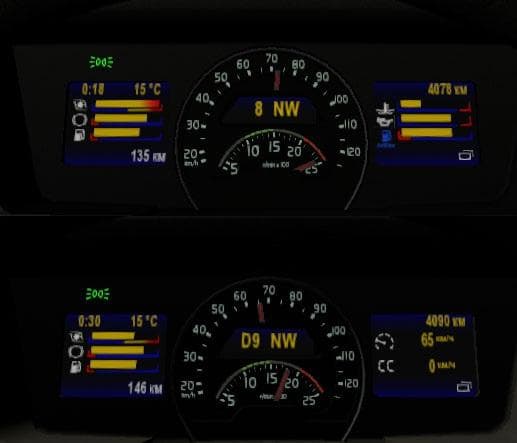
PIVA DASHBOARD FOR VOLVO FH16 - ETS2 mods download is an ETS2 parts.
This mod brings a custom dashboard designed specifically for the Volvo FH16 models from 2012 and 2013. It adds extra features like trip distance, a compass, fuel warnings, and damage indicators that aren't part of the standard in-game instrument panel. The visuals include an additional image on top of the dashboard display, which changes the interior look slightly.
Mods in the parts category like this one typically enhance truck interiors or exteriors by adding new accessories or details that can be selected in the truck customization menu. These mods often target particular truck brands or model years to fit properly and provide a tailored experience. This dashboard fits neatly into that niche for Volvo FH16 owners who want a more detailed cockpit environment.
When using parts mods, it's wise to consider how they interact with other interior or exterior customization mods, as some can conflict if they modify the same elements. Load order may matter if you run multiple mods altering your Volvo's cabin; placing this dashboard mod after general interior packs helps ensure its elements show up correctly without being overwritten.
Players who enjoy personalizing their trucks beyond paint jobs or external accessories might find this dashboard mod appealing. It's especially suitable for those focusing on realism or visual upgrades within their Volvo FH16 setups. Since it enhances functional displays inside the cab, it contributes to immersion during long hauls across regions like Germany, France, or Poland.
Overall, this dashboard add-on is a straightforward way to refresh your Volvo FH16's cabin instruments with some practical info displays added visually. While exact compatibility details are unknown, it fits into the familiar parts mod workflow where you pick and choose specific upgrades per truck model.
How to install
1. Download the file(s) from the original source linked above. 2. Drop them into `Documents/Euro Truck Simulator 2/mod/`. 3. Enable in Mod Manager and restart the game.
After the mod loads, save your game inside a safe area (parking lot or service) before deciding whether to keep it. If the game refuses to load with the mod enabled, check that all required DLCs are installed and that the supported ETS2 version chips on this page include your installed game patch.
Reviews
No ratings yetNo reviews yet — be the first to rate this mod.





