PETERBILT 389 CUSTOM ORANGE SKIN
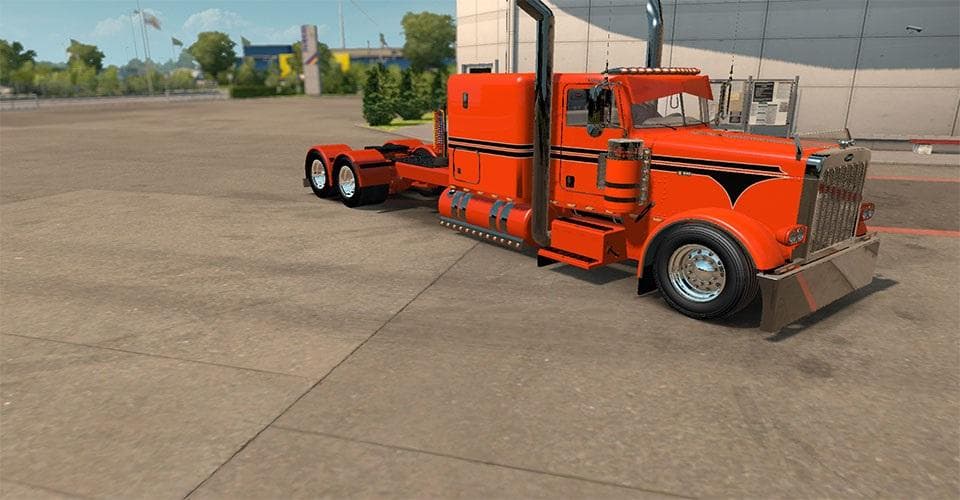
This mod offers a custom orange skin for the Peterbilt 389 with a 63' sleeper. Created by Euro Truck Simulator 2, it allows players to personalize their truck w
This mod offers a custom orange paint job for the Peterbilt 389 truck, specifically designed for the 63' sleeper variant. It doesn't alter the model itself but changes the truck's exterior appearance with a distinctive bright color. Skin mods like this one are applied through the in-game paint shop and require the base vehicle they were made for to work correctly.
Skin mods in Euro Truck Simulator 2 serve to personalize trucks by repainting them without affecting their physical structure or performance. They’re popular among players who want their rig to stand out on the road or match a particular theme or personal taste. Since this mod targets a specific Peterbilt model and sleeper configuration, it fits neatly into setups where that truck is already in use.
When it comes to compatibility, skin mods generally load without conflicting with other gameplay modifications, as long as they don't try to repaint the same vehicle simultaneously. Players should keep an eye on load order if using multiple skins for different vehicles but won’t usually face issues with this type of mod. It integrates smoothly with any modded setup featuring the Peterbilt 389 with a 63' sleeper cabin.
This custom orange skin will appeal to those who favor bold colors and want to add some flair to their Peterbilt 389. It's especially useful for truck enthusiasts who enjoy customizing their fleet’s look without changing any mechanical aspects or adding new parts. If you’re running a heavily modded profile focused on American trucks, this skin can provide that extra bit of individuality.
How to install
1. Download the .scs file. 2. Drop it into `Documents/Euro Truck Simulator 2/mod/`. 3. Enable in Mod Manager. 4. Apply the skin in the truck/trailer paint shop.
After the mod loads, save your game inside a safe area (parking lot or service) before deciding whether to keep it. If the game refuses to load with the mod enabled, check that all required DLCs are installed and that the supported ETS2 version chips on this page include your installed game patch.
Reviews
No ratings yetNo reviews yet — be the first to rate this mod.