Combo Skin Combi Logistics GmbH v1.0 ETS2 - Euro Truck Simulator 2 Mods | American Truck Simulator Mods
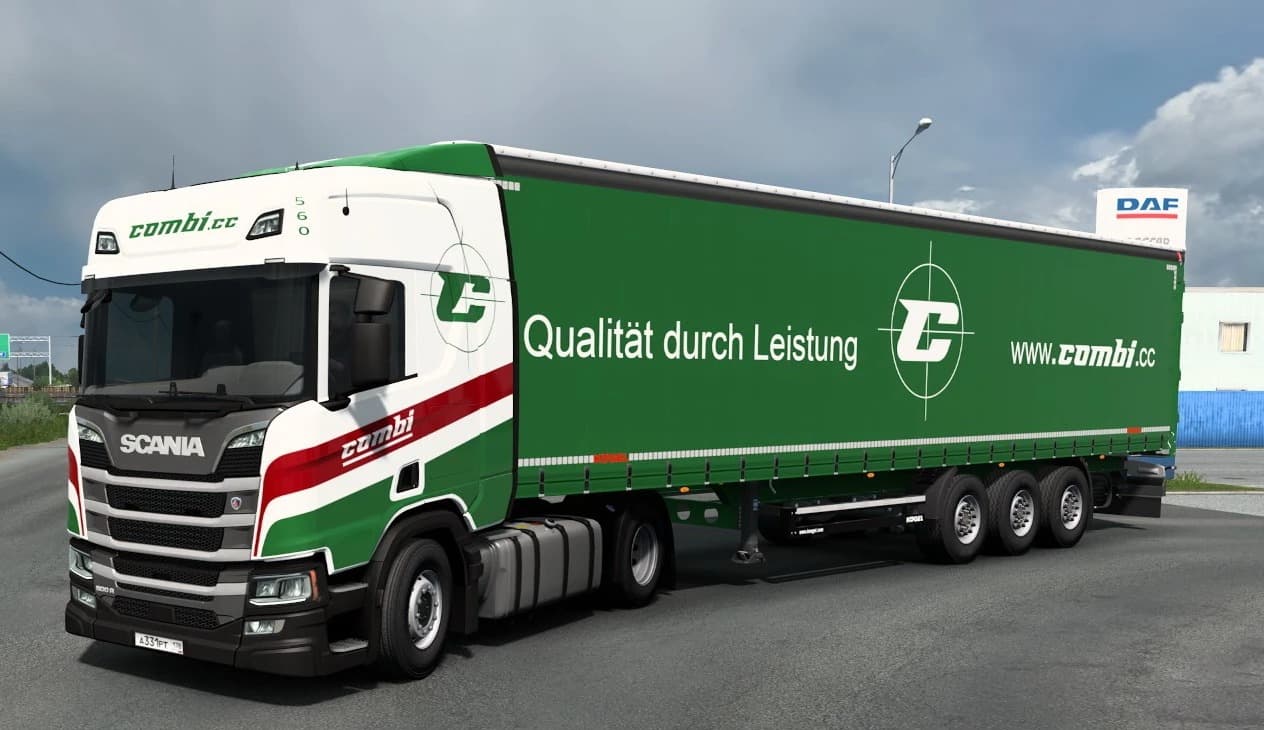
Combo Skin Combi Logistics GmbH v1.0 is a skins mod for ETS2, supporting version 1.0. Created by ETS2Mods, it includes skins for Scania R Next Generation, Scani
Combo Skin Combi Logistics GmbH v1.0 is a skin mod designed for Euro Truck Simulator 2, focusing on repainting specific trucks and trailers to represent the Combi Logistics GmbH brand. This kind of mod doesn't alter the truck's model or performance but changes its visual appearance, giving your vehicles a fresh look tied to a particular company livery. It's intended mainly for the Scania R Next Generation and Scania R SCS models, along with compatible trailers like those from Kogel Cargo.
Skin mods like this one are applied in the paint shop within ETS2, so you can customize your existing trucks without needing any new vehicle models. They rely on the base vehicle they're made for, which means you need those original trucks installed first for the skin to work properly. Since this mod supports ETS2 version 1.0, compatibility with newer versions may require checking or waiting for updates.
In a modded setup, skins generally don't conflict much with other mods since they only change textures. However, if you run multiple skins for the same truck or trailer, load order can affect which skin appears in-game. Placing this skin higher in your mod list will ensure it loads over others that might repaint the same vehicles.
This mod suits players who want to add some variety to their fleet visuals by representing a specific logistics company within ETS2. It’s particularly appealing if you prefer driving Scania trucks and want your rig to stand out with a custom paint job tied to real-world style branding.
Installation follows the usual routine: download and unzip into your Euro Truck Simulator 2 mods folder inside 'My Documents'. After that, enable it in the game's mod manager before launching. No additional configuration is typically required unless combined with other extensive mods affecting paint jobs.
How to install
1. Download the .scs file. 2. Drop it into `Documents/Euro Truck Simulator 2/mod/`. 3. Enable in Mod Manager. 4. Apply the skin in the truck/trailer paint shop.
After the mod loads, save your game inside a safe area (parking lot or service) before deciding whether to keep it. If the game refuses to load with the mod enabled, check that all required DLCs are installed and that the supported ETS2 version chips on this page include your installed game patch.
Reviews
No ratings yetNo reviews yet — be the first to rate this mod.