MODIFIED PETERBILT 389 1.12
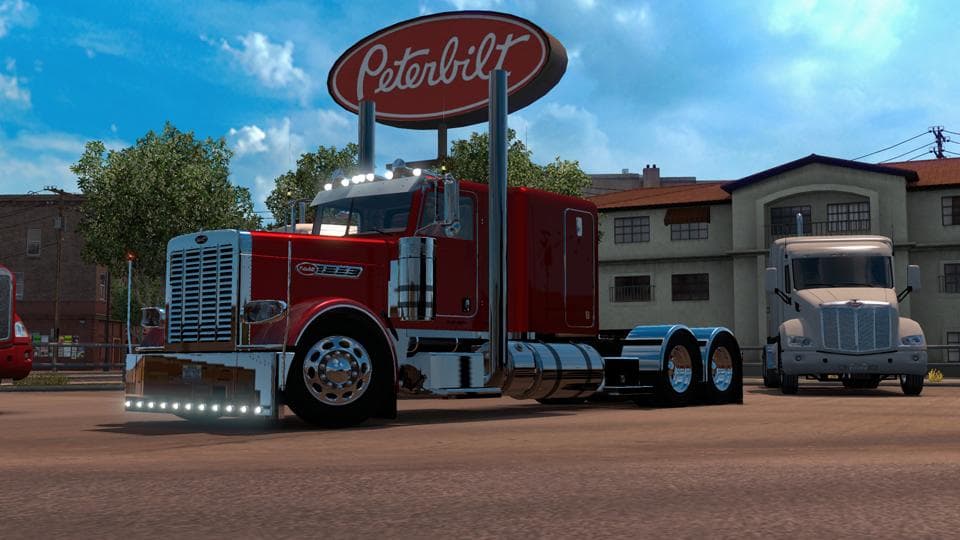
The MODIFIED PETERBILT 389 1.12 mod for Euro Truck Simulator 2 offers various changes to the Peterbilt 389, including dealer def file updates, small lights and
This mod modifies the Peterbilt 389 truck in Euro Truck Simulator 2, focusing on parts customization. It updates the dealer definition files and adds missing small lights and icons that weren't present before. Players can also choose from selectable rivets, chrome, or painted finishes to personalize their rig further. It fits within the parts category of mods, which usually enhance trucks with new accessories or visual tweaks accessible via the customization menu.
Parts mods like this one generally target a specific truck model—in this case, the Peterbilt 389—and allow for detailed tuning options such as adding bull bars, extra lights, or custom exhausts. These kinds of modifications are popular among players who want to make their trucks stand out or better reflect real-world variants. The modifications are applied through the truck customization interface during vehicle setup.
When using parts mods alongside other mods, load order can be important to avoid conflicts. Mods that alter the same truck model might overwrite each other's changes if not loaded properly. Typically, a mod that adds parts should load after any general graphic overhaul mods but before gameplay-affecting ones to ensure all accessories appear correctly.
This particular mod is designed for ETS2 version 1.12 and won't work with versions outside of that range without updates. It's suited for players who enjoy fine-tuning their Peterbilt 389's appearance with additional lighting and cosmetic options beyond what the base game offers.
Truck enthusiasts focused on American long-haul vehicles will appreciate this mod since it enhances an iconic North American model used often in custom setups for US states like Texas or California. If you prefer a more personalized or realistic look for your Peterbilt in ETS2, this mod provides additional detailing options worth exploring.
How to install
1. Download the file(s) from the original source linked above. 2. Drop them into `Documents/Euro Truck Simulator 2/mod/`. 3. Enable in Mod Manager and restart the game.
After the mod loads, save your game inside a safe area (parking lot or service) before deciding whether to keep it. If the game refuses to load with the mod enabled, check that all required DLCs are installed and that the supported ETS2 version chips on this page include your installed game patch.
Reviews
No ratings yetNo reviews yet — be the first to rate this mod.





