MERCEDESACTROS 1844 V3
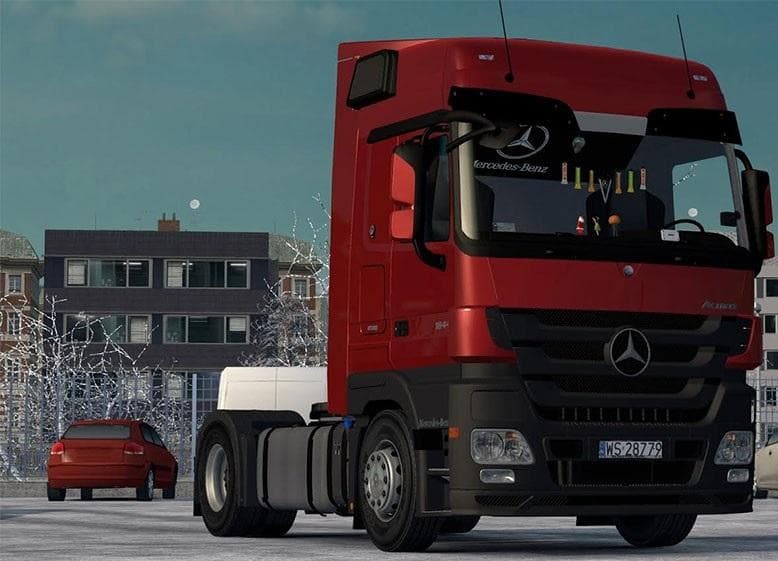
MERCEDESACTROS 1844 V3 is an ETS2 parts.
The MERCEDESACTROS 1844 V3 mod is a parts add-on designed specifically for the Mercedes Actros 1844 truck model in Euro Truck Simulator 2. It introduces a selection of accessories including a light mask, interior elements, metallic paint options, and skins. While it doesn't offer tuning upgrades like engine or transmission changes, it enhances the visual customization available through the truck's own customization menu.
Parts mods like this one focus on adding cosmetic and functional components such as lights, bull bars, mirrors, or cabin accessories. They don't modify gameplay mechanics but instead allow players to personalize their trucks to better suit their style or match specific themes. This particular mod includes DLC cabin accessories, which means having the corresponding official DLC can unlock more interior options for players using this add-on.
In a modded setup, parts mods usually slot in without much fuss. Since this one is standalone and doesn't alter core truck functions or add tuning options, it tends to be compatible with other mods that affect engines or maps. Load order generally doesn't require special attention for parts-only mods unless there are conflicts with similar accessory packs targeting the same vehicle.
The MERCEDESACTROS 1844 V3 fits well for anyone who enjoys customizing their trucks visually rather than mechanically. Fans of the Mercedes Actros series who want to refresh their truck’s look with new skins and metallic finishes will find this mod useful. It also suits those who appreciate subtle interior enhancements alongside exterior tweaks.
Since it's made to work across all versions of ETS2 according to its description, it should integrate smoothly into most game setups without causing version conflicts. However, as always with parts mods relying on DLC content like cabin accessories, players need to have that DLC installed to access all features this mod offers.
How to install
1. Download the file(s) from the original source linked above. 2. Drop them into `Documents/Euro Truck Simulator 2/mod/`. 3. Enable in Mod Manager and restart the game.
After the mod loads, save your game inside a safe area (parking lot or service) before deciding whether to keep it. If the game refuses to load with the mod enabled, check that all required DLCs are installed and that the supported ETS2 version chips on this page include your installed game patch.
Reviews
No ratings yetNo reviews yet — be the first to rate this mod.





