MERCEDES BENZ ACTROS MP3 TUNING UPDATE 1.22
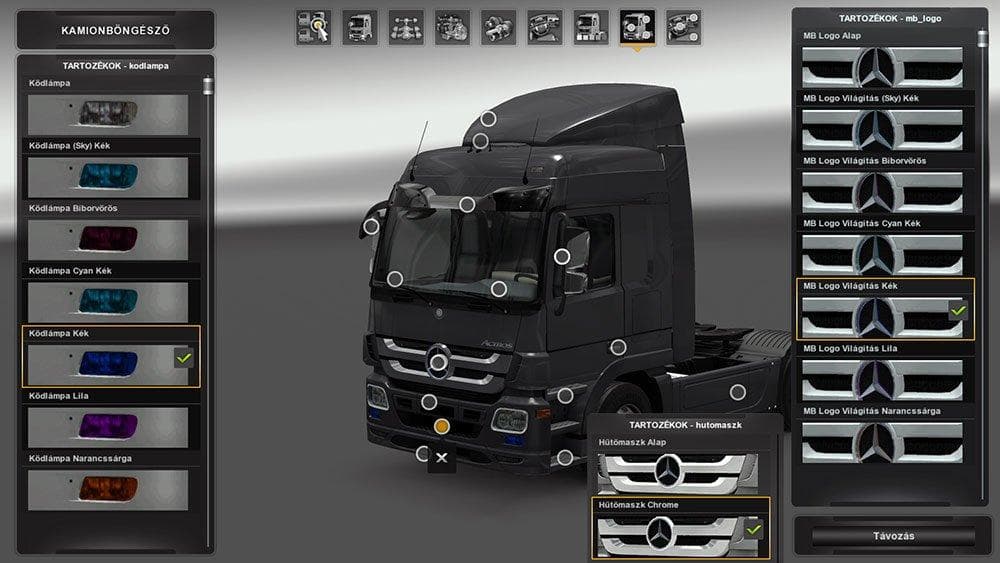
The MERCEDES BENZ ACTROS MP3 TUNING UPDATE 1.22 mod for Euro Truck Simulator 2 offers changes to fog lights, logo highlighting, and an optional grille. Created
The MERCEDES BENZ ACTROS MP3 TUNING UPDATE 1.22 is a parts mod designed for Euro Truck Simulator 2 version 1.22. It focuses on enhancing the look of the Actros MP3 truck model by introducing changes to fog lights, adding a highlighted logo, and including an optional grille. These tweaks are installed through the truck customization menu, where you can add or replace accessories to personalize your vehicle.
Parts mods like this one allow players to modify specific truck models by adding or changing elements such as lights, bull bars, exhausts, mirrors, and interior components. They fit well into a modded setup where players want more detailed customization options beyond what the base game provides. Since this update targets the Actros MP3 specifically, it complements other mods that focus on Mercedes-Benz trucks or tuning packs.
When using parts mods, it's important to pay attention to load order because some items might conflict if they alter the same components. Generally, tuning updates for a particular truck should be loaded after general tuning packs but before any skins that might cover those parts. This ensures that all customizations appear correctly without being overwritten.
This mod suits players who enjoy fine-tuning their trucks' appearance and want more variety in their customization choices for the Actros MP3. It adds subtle yet noticeable visual details that can make your rig stand out during long hauls across Europe.
If you're running ETS2 version 1.22 and like driving Mercedes-Benz vehicles, this update provides straightforward enhancements that mesh well with other compatible parts mods or skin packs without causing major compatibility issues.
How to install
1. Download the file(s) from the original source linked above. 2. Drop them into `Documents/Euro Truck Simulator 2/mod/`. 3. Enable in Mod Manager and restart the game.
After the mod loads, save your game inside a safe area (parking lot or service) before deciding whether to keep it. If the game refuses to load with the mod enabled, check that all required DLCs are installed and that the supported ETS2 version chips on this page include your installed game patch.
Reviews
No ratings yetNo reviews yet — be the first to rate this mod.





