MERCEDES-BENZ ACTROS 1.21.X
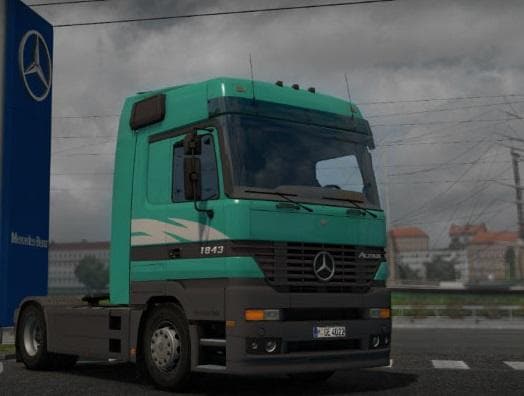
The MERCEDES-BENZ ACTROS 1.21.X mod for ETS2 offers custom interiors, sounds, lightmask, animated wipers, and all engines with nameplates. Version 2.1 includes
The MERCEDES-BENZ ACTROS 1.21.X mod brings a set of parts and tuning options for the Actros truck model compatible with ETS2 version 1.21. Mods like this one typically add various accessories such as light masks, animated wipers, and engine nameplates, all accessible through the truck customization menu. This allows players to personalize their vehicle beyond the base game offerings.
Parts mods in Euro Truck Simulator 2 focus on enhancing visual details and functional components of trucks. In this case, it covers interior elements and sound modifications alongside exterior parts, providing a more immersive driving experience. These additions are usually designed to fit specific truck models perfectly, ensuring that every item matches the look and feel of the original vehicle.
When integrating such a parts mod into a modded setup, it’s advisable to load it after any general truck models or graphics packs to avoid conflicts. Compatibility is generally good if you keep the game version aligned—here specifically version 1.21—since mismatched versions can lead to issues or missing features. Since this mod targets one truck model, it usually doesn't interfere with other trucks or map mods.
Drivers who enjoy customizing their trucks down to finer details will find this kind of mod appealing. It caters well to those who want their Actros rig to stand out on roads across various in-game regions such as Germany, France, or Spain by enhancing both looks and sounds without changing gameplay mechanics.
Overall, this mod suits players looking for deeper personalization options within the Actros model range, especially if they run a setup focused on realism and detail in Euro Truck Simulator 2's 1.21 environment.
How to install
1. Download the file(s) from the original source linked above. 2. Drop them into `Documents/Euro Truck Simulator 2/mod/`. 3. Enable in Mod Manager and restart the game.
After the mod loads, save your game inside a safe area (parking lot or service) before deciding whether to keep it. If the game refuses to load with the mod enabled, check that all required DLCs are installed and that the supported ETS2 version chips on this page include your installed game patch.
Reviews
No ratings yetNo reviews yet — be the first to rate this mod.





