MAN TGX 2020 Improved Dashboard v1.60
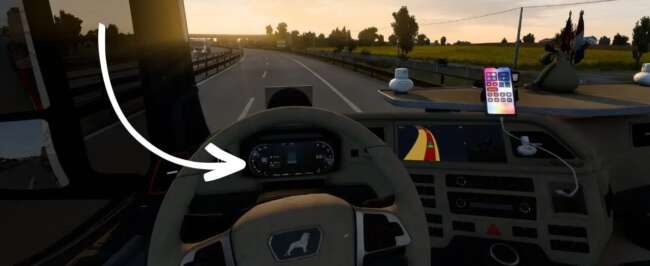
The MAN TGX 2020 Improved Dashboard mod by ets2mods offers a redesigned dashboard with a modern layout, higher resolution textures, sharper gauges, and enhanced
The MAN TGX 2020 Improved Dashboard v1.60 mod updates the interior of the MAN TGX 2020 truck by offering a redesigned dashboard with a more modern layout. This mod brings higher resolution textures and sharper gauges to enhance the in-cab experience, making the displays clearer and easier to read. The lighting and backlighting for the dashboard have also been improved, adding better visibility during night driving or low-light conditions.
Parts mods like this one are designed to add or replace specific components within a truck's customization menu. In this case, it focuses on enhancing the interior part of the truck rather than exterior accessories. Players who enjoy tweaking their trucks down to fine details will appreciate how these changes affect immersion without altering gameplay mechanics.
When integrating parts mods into your setup, it's wise to consider load order, especially if other mods also modify interior elements of the MAN TGX 2020. Since this mod targets version 1.60 of ETS2 and matches that game version exactly, compatibility should be smooth if you're running matching versions. Conflicts might occur if other mods change the same dashboard files or textures, so testing is recommended.
This mod is suited for players who prefer a more realistic or refreshed look inside their MAN TGX 2020 cabin. It doesn't overhaul gameplay but provides a subtle visual upgrade that can make long hauls feel less repetitive by improving visual clarity and aesthetics inside the truck.
If you frequently use parts mods to customize your vehicles and want your MAN TGX 2020's dashboard to look sharper and more contemporary, this tweak fits right in without adding complexity or altering core functions.
How to install
1. Download the file(s) from the original source linked above. 2. Drop them into `Documents/Euro Truck Simulator 2/mod/`. 3. Enable in Mod Manager and restart the game.
After the mod loads, save your game inside a safe area (parking lot or service) before deciding whether to keep it. If the game refuses to load with the mod enabled, check that all required DLCs are installed and that the supported ETS2 version chips on this page include your installed game patch.
Reviews
No ratings yetNo reviews yet — be the first to rate this mod.





