LIGHTPACK 1.22.X
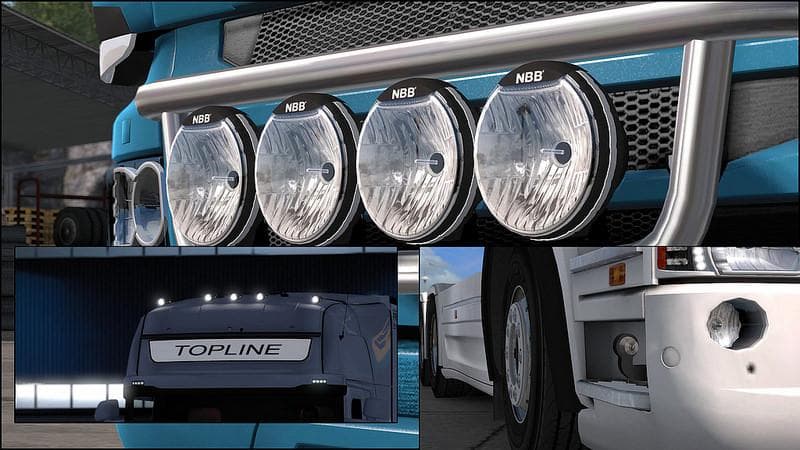
LIGHTPACK 1.22.X is a parts mod for ETS2 version 1.22, created by Euro Truck Simulator 2. The latest version includes added torpedos with backlighting and updat
LIGHTPACK 1.22.X is a parts mod designed for Euro Truck Simulator 2 versions 1.0 and 1.22, bringing additional lighting options and accessories to your truck customization menu. It focuses on enhancing the truck’s exterior appearance by adding new light components, such as updated marker lights and torpedos fitted onto the back section near the spoiler cap. These sorts of parts mods typically allow players to personalize their trucks beyond what the base game offers, giving them more control over their vehicle's look and detail.
Parts mods like LIGHTPACK usually slot into the tuning interface where you can swap or add bull bars, lights, exhausts, mirrors, and interior details depending on what fits your truck model. They often target specific brands or models but can sometimes be compatible with multiple ones if they share similar mounting points. In this case, the lighting upgrades help add subtle but noticeable tweaks that improve realism or style without altering gameplay mechanics.
When adding parts mods to your setup, it's wise to consider load order since conflicting mods that change the same truck areas can cause issues or visual glitches. Typically, lighting parts should be loaded after major truck model changes but before larger overhaul mods if you use any. Since this mod supports version 1.22 of ETS2, it's compatible with other content updates from that era but might need checking if combined with newer mods targeting later game versions.
This mod appeals to players who enjoy customizing their rigs with detailed accessories and prefer a more tailored look while driving through places like Germany or France where realistic lighting can enhance immersion during night hauls. If you run a modded fleet and want to add some subtle lighting tweaks without heavy alterations or large file sizes, LIGHTPACK offers an easy-to-install option.
How to install
1. Download the file(s) from the original source linked above. 2. Drop them into `Documents/Euro Truck Simulator 2/mod/`. 3. Enable in Mod Manager and restart the game.
After the mod loads, save your game inside a safe area (parking lot or service) before deciding whether to keep it. If the game refuses to load with the mod enabled, check that all required DLCs are installed and that the supported ETS2 version chips on this page include your installed game patch.
Reviews
No ratings yetNo reviews yet — be the first to rate this mod.





