Lighting Improvements v1.60
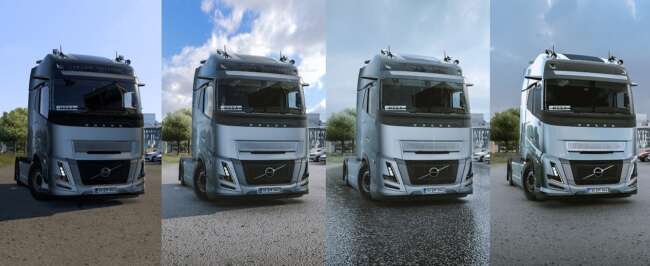
The Lighting Improvements mod by ets2mods is a parts mod for ETS2 version 1.60. It offers graphics and lighting enhancements, including Temporary Anti-Aliasing,
Lighting Improvements v1.60 is a parts mod designed to enhance the visual aspects of your truck in Euro Truck Simulator 2, specifically focusing on lighting effects. Mods like this typically add or modify accessories related to illumination, such as upgraded headlights or auxiliary lights, which you can apply through the truck customization menu. This version aligns with ETS2 update 1.60, ensuring compatibility with that release.
Parts mods are popular for tailoring your truck's appearance and functionality, often targeting certain truck brands or models. While Lighting Improvements focuses on graphical enhancements around lighting and motion blur effects, it fits naturally into setups where players want a more immersive driving experience without altering core gameplay. These mods usually slot in alongside tuning packs and cosmetic upgrades without conflicting with map or vehicle overhaul mods.
In terms of installation and load order, parts mods like this one generally load after core game files but before map expansions or large vehicle bundles. Since this mod deals primarily with visual improvements rather than new physical parts, conflicts are rare but still worth checking if other graphics-related mods are installed. It's advisable to back up your profiles before adding any new mods that alter graphics settings.
This mod suits players who appreciate subtle graphical enhancements that make nighttime driving or adverse weather conditions more engaging. If you run a heavily modded setup focused on visuals or realism, Lighting Improvements offers an extra layer of polish. It doesn’t change gameplay mechanics but enriches the look and feel during long hauls across various European regions.
Given its nature as a lighting-focused parts mod compatible with ETS2 version 1.60, it appeals to those who want to tweak their truck’s aesthetics without overhauling performance or adding complex features. Players aiming for better immersion through improved light rendering should consider adding it to their collection.
How to install
1. Download the file(s) from the original source linked above. 2. Drop them into `Documents/Euro Truck Simulator 2/mod/`. 3. Enable in Mod Manager and restart the game.
After the mod loads, save your game inside a safe area (parking lot or service) before deciding whether to keep it. If the game refuses to load with the mod enabled, check that all required DLCs are installed and that the supported ETS2 version chips on this page include your installed game patch.
Reviews
No ratings yetNo reviews yet — be the first to rate this mod.





