LIGHTBOX RENAULT PREMIUM 1.19
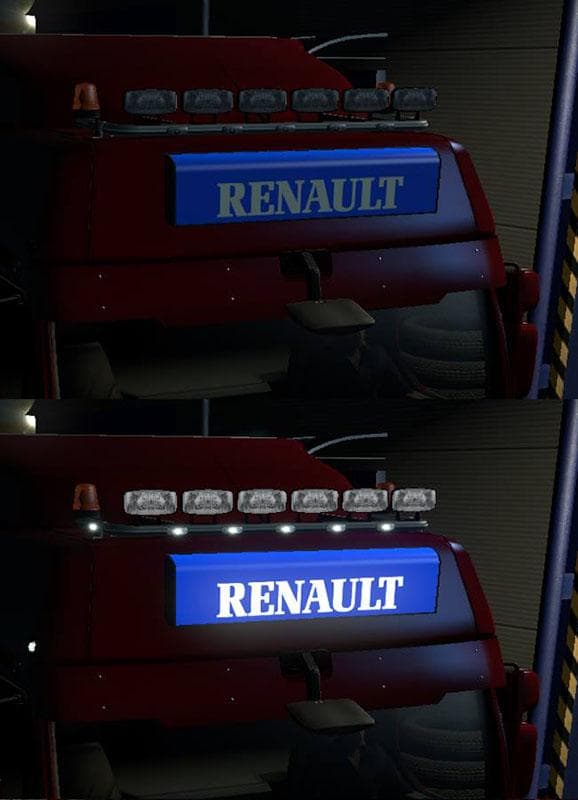
The LIGHTBOX RENAULT PREMIUM 1.19 mod adds specific parts designed for the Renault Premium truck model in Euro Truck Simulator 2, compatible with game versions 1.18 and 1.19. This type of mod typically enhances your vehicle customization options by introducing new accessories like lightboxes, which can be installed through the truck tuning menu. Such parts mods focus on improving the visual detail and personalization of a particular truck brand or model, making your rig stand out on the road.
Parts mods like this one integrate smoothly into a modded setup since they usually affect only the appearance or configuration of the truck without altering gameplay mechanics. However, it's advisable to check load order when using multiple parts mods to avoid conflicts, especially if more than one modifies the same truck model or category. Lightbox additions generally don’t interfere with map or trailer mods but should be placed appropriately among other tuning mods.
This mod is well-suited for players who prefer customizing their Renault Premium trucks with extra lighting features to enhance realism or simply give their vehicle a unique look. It's particularly handy if you already have other Renault-specific parts installed and want to expand your options without switching to an entirely different mod pack.
Since this mod focuses solely on parts and accessories for a specific truck model, it fits well in setups that prioritize detailed truck customization over broader gameplay changes. Players aiming for authenticity in their fleet’s appearance may find this addition useful, especially when driving routes across regions like France or Germany where Renault trucks are common.
Overall, LIGHTBOX RENAULT PREMIUM 1.19 offers an easy way to add some visual flair to your Renault Premium trucks within ETS2's existing framework, enhancing immersion through additional lighting accessories without complicating mod management.
How to install
1. Download the file(s) from the original source linked above. 2. Drop them into `Documents/Euro Truck Simulator 2/mod/`. 3. Enable in Mod Manager and restart the game.
After the mod loads, save your game inside a safe area (parking lot or service) before deciding whether to keep it. If the game refuses to load with the mod enabled, check that all required DLCs are installed and that the supported ETS2 version chips on this page include your installed game patch.
Reviews
No ratings yetNo reviews yet — be the first to rate this mod.





