JB Light Pack v1.60
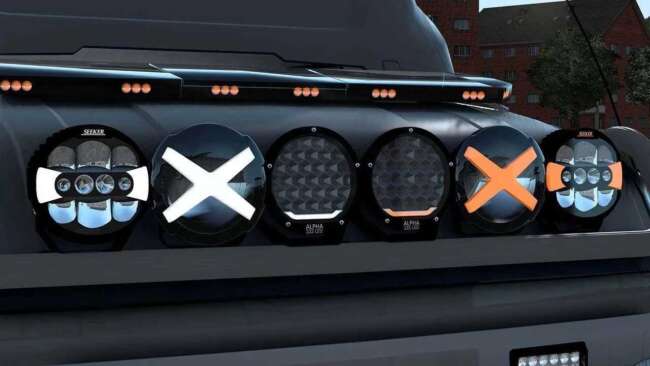
JB Light Pack is an ETS2 parts. Listed compatible with ETS2 1.60.
The JB Light Pack v1.60 is a parts mod designed to add a wide variety of lighting options to your trucks in Euro Truck Simulator 2. It includes over seventy different light variants, such as spot lamps, LED bars, and position lights, giving players plenty of choices for customizing their vehicles' appearance and functionality. Mods like this one are accessed through the truck customization menu, where you can mix and match accessories to suit your style or needs.
Parts mods like this generally enhance the visual detail and realism of trucks by allowing extra accessories beyond what's available in the base game. Lighting packs often appeal to players who want their rigs to stand out on the road during night drives or who enjoy tweaking every detail of their truck's setup. Since it supports ETS2 version 1.60, it's important that your game version matches for proper compatibility.
When adding lighting mods to a modded ETS2 setup, it’s good practice to load parts mods after map or gameplay mods but before any other cosmetic mods that might affect truck models or lights specifically. This helps avoid conflicts or overwriting issues between mods targeting the same truck components. The JB Light Pack is likely compatible with most other tuning and parts mods since it focuses solely on lighting elements.
Truck enthusiasts who enjoy personalizing their vehicles will find this mod useful because it broadens the options for visual customization without altering performance aspects. Whether you’re running long hauls across European regions like Germany or France or just want your rig to look unique in multiplayer convoys, additional lighting can improve both aesthetics and visibility.
Since this pack works with all trucks rather than being brand-specific, it fits well into diverse collections of parts mods. Players who collect multiple tuning packs can incorporate this one without worrying about restrictions based on truck make or model. The creator ets2mods has kept it simple yet flexible enough for general use.
How to install
1. Download the file(s) from the original source linked above. 2. Drop them into `Documents/Euro Truck Simulator 2/mod/`. 3. Enable in Mod Manager and restart the game.
After the mod loads, save your game inside a safe area (parking lot or service) before deciding whether to keep it. If the game refuses to load with the mod enabled, check that all required DLCs are installed and that the supported ETS2 version chips on this page include your installed game patch.
Reviews
No ratings yetNo reviews yet — be the first to rate this mod.





