GTM RJL SCANIA V8 DOORHANDLES
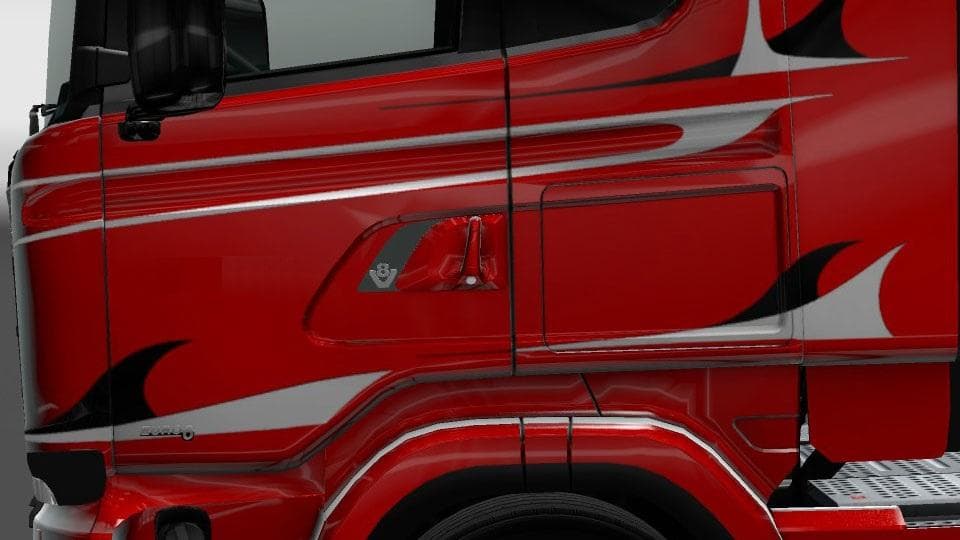
GTM RJL SCANIA V8 DOORHANDLES is a parts mod by Euro Truck Simulator 2, adding 3 new doorhandles to RJL's Scania mods. The doorhandles come in plastic, paint, a
The GTM RJL SCANIA V8 DOORHANDLES mod adds three different doorhandle options featuring a V8 trim for the popular RJL Scania truck mods in Euro Truck Simulator 2. These handles come in plastic, painted, and chrome finishes, providing some subtle yet distinct customization choices. They fit the R, Streamline, and T series models of RJL’s Scania trucks, expanding the visual detail available to fans of this brand.
Parts mods like these focus on small but noticeable upgrades that fit directly into the truck customization menu. Players can swap out or add new accessories to personalize their vehicles beyond what the base game offers. Doorhandles might seem minor, but they add an extra layer of realism and individuality when tuning your truck’s appearance.
When incorporating this mod into a setup with other parts or tuning mods for RJL Scania trucks, it generally slots in without much fuss since it targets specific components. Still, it's wise to load it after any larger overhaul mods that might affect door parts to avoid conflicts. Compatibility is usually straightforward for gear like this since it only changes one part type.
This mod appeals mostly to players who enjoy detailed visual tweaks on their rigs and want more variety in their truck's looks without altering performance or gameplay elements. If you run multiple RJL Scania mods and appreciate small touches that enhance authenticity, these doorhandles could be a neat addition.
While the exact ETS2 versions supported are unknown, parts mods such as this typically require compatible base truck models from RJL and should be easy to enable through the mod manager. Testing by users often helps clarify any version-specific quirks after installation.
How to install
1. Download the file(s) from the original source linked above. 2. Drop them into `Documents/Euro Truck Simulator 2/mod/`. 3. Enable in Mod Manager and restart the game.
After the mod loads, save your game inside a safe area (parking lot or service) before deciding whether to keep it. If the game refuses to load with the mod enabled, check that all required DLCs are installed and that the supported ETS2 version chips on this page include your installed game patch.
Reviews
No ratings yetNo reviews yet — be the first to rate this mod.





