GTM CUSTOM HEADLIGHTS FOR SCANIA RJLS V1.1
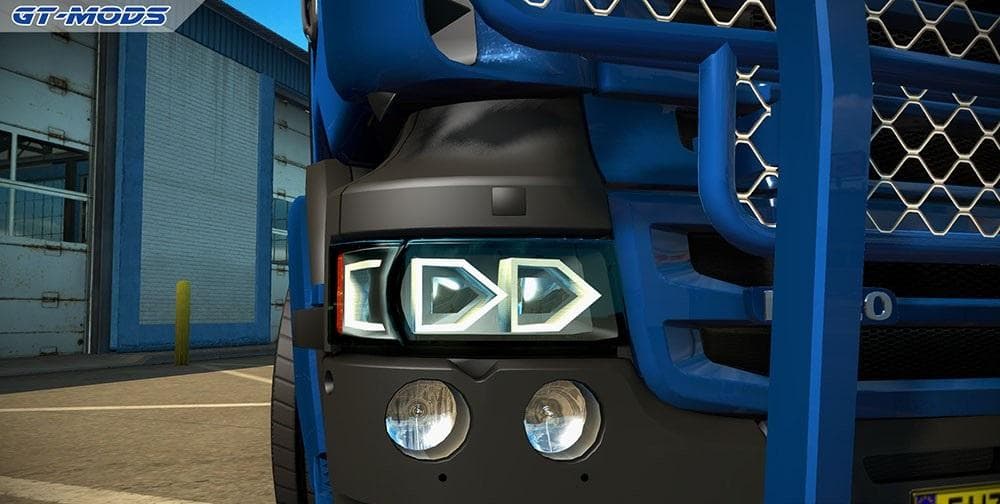
GTM Custom Headlights for Scania RJLS is a parts mod version 1.1 by Euro Truck Simulator 2. It adds new headlight models seamlessly integrated for both RJL Scan
This mod introduces custom headlight models specifically designed for the Scanias in the RJL series. It's a straightforward parts mod that integrates new lighting options into the truck customization menu, allowing you to alter the look of your Scania without affecting other truck brands. Since it targets both RJL Scanias, it fits nicely if you're focused on enhancing these particular models with some visual tweaks.
Parts mods like this one typically add accessories such as lights, mirrors, or exhausts, giving players more control over their trucks' appearance and sometimes functionality. They install via the game's mod manager and are usually activated from within the truck dealer or garage customization screens. This kind of mod doesn't change gameplay mechanics but enriches how your rig stands out on ETS2's roads.
Being a standalone mod means it doesn't rely on or overwrite other files, which simplifies compatibility with other modifications. That said, when running several parts mods simultaneously, it's wise to check load order if you notice any conflicts or missing textures, especially when multiple mods target the same truck model.
Players who enjoy fine-tuning their Scanias will find this mod useful for adding variety to their fleet. Whether you're aiming for a unique look or just want to experiment with different headlight styles on your RJL Scania trucks, this mod slots in smoothly with a modded setup focused on parts upgrades.
It's made for ETS2 version 1.1 and blends well into games with various regional map expansions like those covering European countries such as Germany, France, or Sweden. If you're cruising across these areas and want your Scania to catch some extra attention at night, swapping out headlights with this option could be just what you need.
How to install
1. Download the file(s) from the original source linked above. 2. Drop them into `Documents/Euro Truck Simulator 2/mod/`. 3. Enable in Mod Manager and restart the game.
After the mod loads, save your game inside a safe area (parking lot or service) before deciding whether to keep it. If the game refuses to load with the mod enabled, check that all required DLCs are installed and that the supported ETS2 version chips on this page include your installed game patch.
Reviews
No ratings yetNo reviews yet — be the first to rate this mod.





