Gearbox Pack by Paulski2610
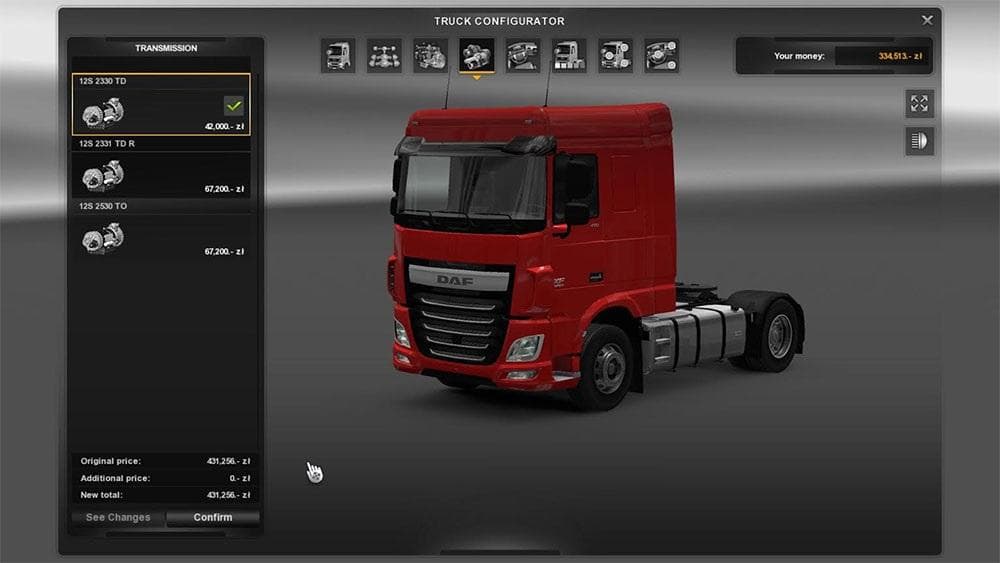
Gearbox Pack by Paulski2610 is a parts mod for Euro Truck Simulator 2 that adds new gearbox options to the game. Mods like this expand the customization possibilities within the truck tuning menu, letting players modify their trucks' drivetrains beyond stock choices. This type of mod is particularly useful if you're looking to tailor your truck's performance characteristics or simply want more variety in the gearboxes available for your vehicles.
Parts mods generally focus on enhancing visual or functional aspects of trucks by adding accessories and components such as lights, exhausts, or in this case, gearboxes. They often target specific truck brands or models but can sometimes be applied more broadly depending on how they're designed. The Gearbox Pack by Paulski2610 fits into this category by concentrating specifically on drivetrain components rather than exterior or interior styling.
When integrating parts mods into a heavily modded setup, it's wise to pay attention to load order. Since gearbox mods alter vehicle parameters, conflicts can arise if multiple mods try to change the same component. Typically, placing gearbox-related mods toward the bottom of your load order helps ensure they take effect properly without being overridden by other files.
This mod supports ETS2 version 1.0, so compatibility with newer versions may require updates or patches from the community. As with many parts mods, installation usually involves placing the mod file into your ETS2 mod folder and activating it through the game's mod manager. No specific file size details are provided, but such mods tend to be lightweight compared to map expansions or large asset packs.
Players who enjoy fine-tuning their trucks and want more control over mechanical aspects might find this gearbox pack appealing. It suits those who prefer deeper customization and want to explore different performance setups beyond what base game gearboxes offer.
How to install
1. Download the file(s) from the original source linked above. 2. Drop them into `Documents/Euro Truck Simulator 2/mod/`. 3. Enable in Mod Manager and restart the game.
After the mod loads, save your game inside a safe area (parking lot or service) before deciding whether to keep it. If the game refuses to load with the mod enabled, check that all required DLCs are installed and that the supported ETS2 version chips on this page include your installed game patch.
Reviews
No ratings yetNo reviews yet — be the first to rate this mod.





