FLAGS FOR MAN TGA BY MADSTER 1.22.X
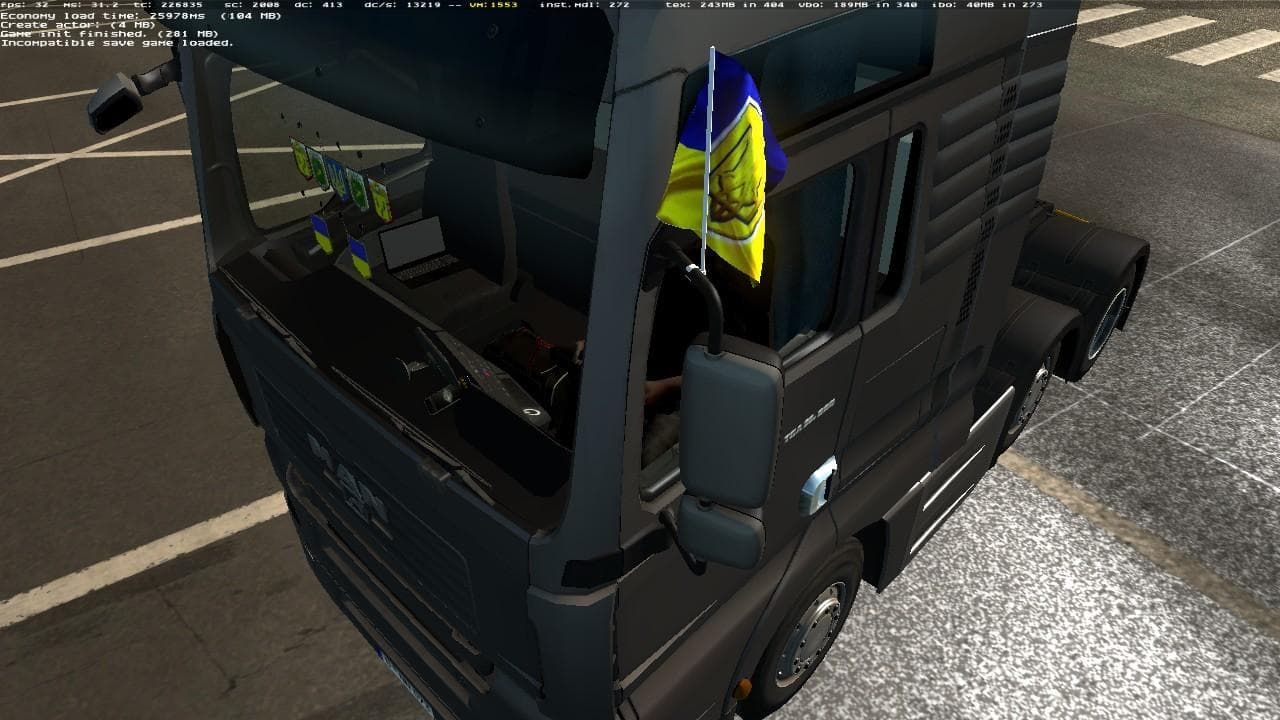
This mod adds country flags (Ukraine, Russia, Belarus, Kazakhstan, former Soviet Union) to the left side of the MAN TGA by Madster in ETS2 version 1.22. It fall
FLAGS FOR MAN TGA BY MADSTER 1.22.X is a parts mod designed specifically for the MAN TGA truck in Euro Truck Simulator 2, compatible with version 1.22 of the game. It adds a selection of country flags—Ukraine, Russia, Belarus, Kazakhstan, and the former Soviet Union—to the left side of the truck. This kind of mod falls under parts or tuning mods, which generally allow players to customize their vehicles with additional accessories and details through the truck customization menu.
Parts mods like this one are all about enhancing visual detail and personalization. They let you add items that fit neatly onto your truck model without altering gameplay mechanics. Flags or other small decorations often appeal to players who want their rig to stand out on the road or reflect personal or regional affiliations.
When adding a parts mod such as this to your setup, it usually slots into your mod manager alongside other tuning mods without conflicting with core gameplay mods. It's wise to keep track of load order for parts that modify the same truck model to avoid any override issues. Since this mod targets only MAN TGA trucks, compatibility concerns are mostly limited to similar tuning or paint jobs also applied to that vehicle.
Truck enthusiasts who enjoy detailed customization will find this mod appealing. It’s especially suited for those driving MAN TGA trucks who want to represent specific countries through these small but noticeable additions. The flags add a bit of personality without interfering with performance or other mods.
Installing parts mods like FLAGS FOR MAN TGA BY MADSTER typically involves placing them in your ETS2 mod folder and activating them via the in-game menu. Because this mod supports game version 1.22, it should be used with matching ETS2 versions to ensure stability and proper functionality.
How to install
1. Download the file(s) from the original source linked above. 2. Drop them into `Documents/Euro Truck Simulator 2/mod/`. 3. Enable in Mod Manager and restart the game.
After the mod loads, save your game inside a safe area (parking lot or service) before deciding whether to keep it. If the game refuses to load with the mod enabled, check that all required DLCs are installed and that the supported ETS2 version chips on this page include your installed game patch.
Reviews
No ratings yetNo reviews yet — be the first to rate this mod.





