ENGINES 799 AND 848 HP
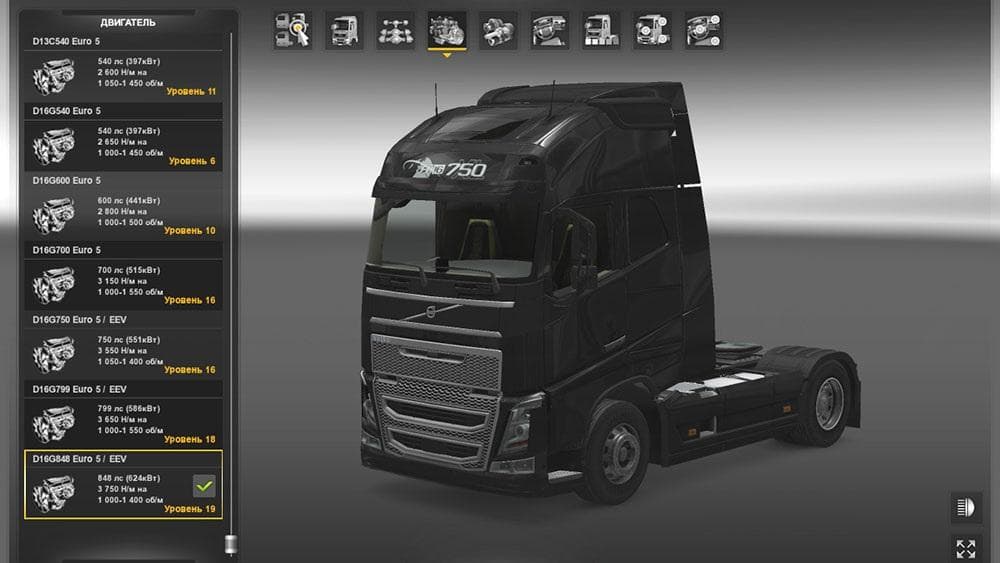
This mod by Euro Truck Simulator 2 adds 799 and 848 hp engines for all default trucks, along with a fix for cockpit volume. The mod opens up at a certain level
The ENGINES 799 AND 848 HP mod adds powerful engine options to all default trucks in Euro Truck Simulator 2. It upgrades the horsepower to 799 and 848, giving trucks a significant boost in performance. Alongside the engine upgrades, it includes a small adjustment that reduces increased cockpit volume, improving in-cabin sound balance when these engines are used.
Parts mods like this one enhance truck customization by introducing new components such as engines, exhausts, or lighting setups. They fit into the truck tuning menu where players can pick from various accessories and performance upgrades tailored for specific truck models. Mods focusing on engines usually aim to provide more realistic or varied driving experiences by altering power output and sound dynamics.
When integrating parts mods into a broader modded setup, it's crucial to consider load order because multiple mods might affect similar truck attributes. Engine tuning mods should generally be loaded after any general parts or graphics overhauls to ensure their changes take effect properly without conflicts. Compatibility with other engine or sound mods may also require some testing to avoid unexpected behavior.
This mod suits players who want more power under the hood of their default fleet without switching to entirely new trucks or brands. Those who enjoy tweaking performance and experiencing different driving dynamics across familiar vehicles will find it useful. The adjustment for cockpit volume makes it a bit more polished compared to basic engine swaps.
While details like supported ETS2 versions or file size aren't specified, installing this type of mod usually involves placing files in the correct mod folder and activating them through the game's Mod Manager. As with most parts mods, keeping backups before adding new content is wise to prevent issues during gameplay.
How to install
1. Download the file(s) from the original source linked above. 2. Drop them into `Documents/Euro Truck Simulator 2/mod/`. 3. Enable in Mod Manager and restart the game.
After the mod loads, save your game inside a safe area (parking lot or service) before deciding whether to keep it. If the game refuses to load with the mod enabled, check that all required DLCs are installed and that the supported ETS2 version chips on this page include your installed game patch.
Reviews
No ratings yetNo reviews yet — be the first to rate this mod.





