ENGINE & GEARBOX FOR ALL TRUCKS 1.22
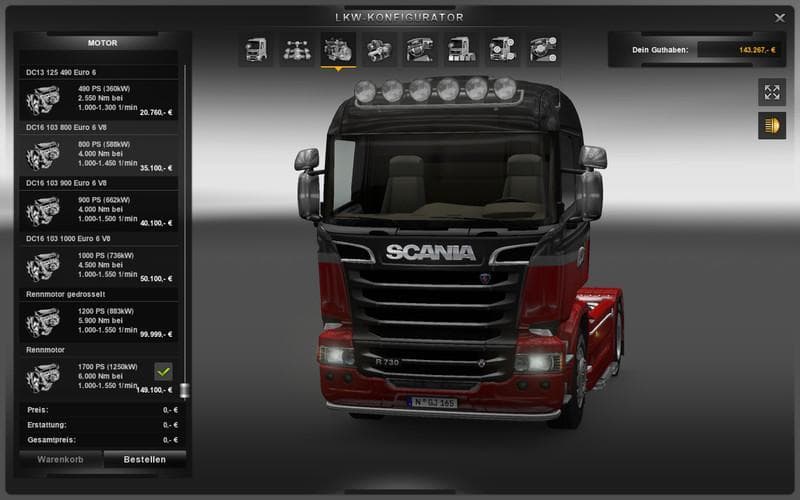
ENGINE & GEARBOX FOR ALL TRUCKS 1.22 is a parts mod by Euro truck simulator 2 that offers engine replacements ranging from 730 hp to 2000 hp for players who pre
This mod, titled ENGINE & GEARBOX FOR ALL TRUCKS 1.22, upgrades the engines across all trucks in Euro Truck Simulator 2 version 1.22. Instead of the standard engine outputs, it introduces more powerful options ranging from 730 hp up to an impressive 2000 hp. These enhanced engines provide a new level of performance for those who prefer faster or more responsive trucks in their gameplay.
Parts mods like this one modify the truck customization menu by adding or changing components such as engines and gearboxes. Unlike mods that focus on visual accessories like bull bars or lights, this type alters the mechanical aspects, directly impacting how a truck behaves on the road. Players can fit these parts to any compatible truck model, allowing for a broad enhancement across their fleet.
When integrating this type of parts mod into a modded setup, it's good practice to ensure compatibility with other tuning mods. Since this one replaces all engines and gearboxes, it should generally be loaded after any visual-only parts mods to avoid conflicts. Users often place it higher in the load order if they want its changes to take precedence over other engine-related modifications.
The mod suits players who enjoy pushing their trucks beyond default limits and want quicker acceleration or higher top speeds for hauling jobs. It’s also useful for those running large convoys or multiplayer sessions where consistent performance upgrades help balance gameplay dynamics.
Because the creator is unknown and file size details aren't provided, it's advisable to test this mod cautiously with existing profiles and save games. Keeping backups before installing any engine or gearbox modification is always recommended due to potential impacts on game physics and stability.
How to install
1. Download the file(s) from the original source linked above. 2. Drop them into `Documents/Euro Truck Simulator 2/mod/`. 3. Enable in Mod Manager and restart the game.
After the mod loads, save your game inside a safe area (parking lot or service) before deciding whether to keep it. If the game refuses to load with the mod enabled, check that all required DLCs are installed and that the supported ETS2 version chips on this page include your installed game patch.
Reviews
No ratings yetNo reviews yet — be the first to rate this mod.





