DLC Cabin Accessory - Table
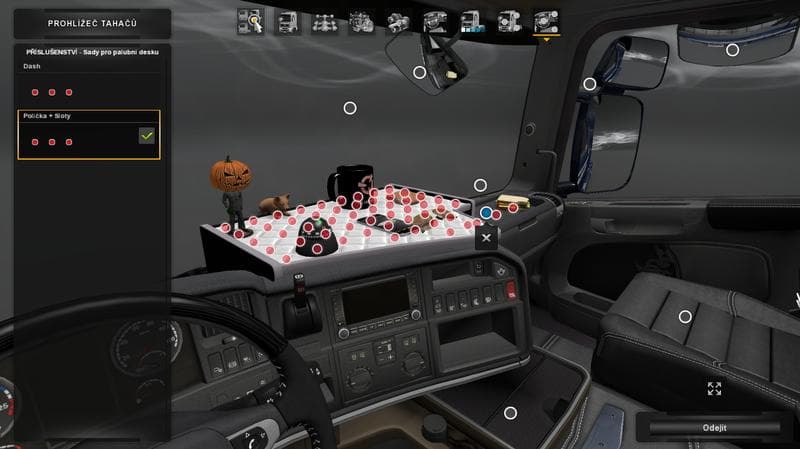
This mod, titled DLC Cabin Accessory - Table, adds 47 new slots for accessories on the Scania R and Streamline trucks by SCS, as well as the R and T models by R
This mod adds a table accessory for Scania trucks, specifically the R and Streamline models by SCS and the R,T variants by RJL. It expands the number of accessory slots significantly, providing 47 additional spaces beyond the standard three in the cabin. This lets you customize your truck interior with more items than usual, making your cab feel more personalized or detailed.
Parts mods like this one are designed to enhance customization options in Euro Truck Simulator 2. They usually appear in the truck customization menu where you can add or change accessories such as lights, bull bars, exhausts, mirrors, and interior decorations. Mods focused on cabin parts give players the chance to decorate their driving space beyond factory defaults.
When using this kind of mod, it's important to have the base DLC Cabin Accessory installed since it adds core content that these expansions build upon. Since it targets specific Scania models and addon trucks from popular creators like RJL, make sure your setup includes those trucks for compatibility. Load order generally places parts mods after map or gameplay mods to avoid conflicts but before skins or tuning packs affecting visuals.
Truck enthusiasts who enjoy spending time fine-tuning their interiors will find this mod useful. Whether you want a cluttered desk area or just more room to place various cabin items, expanding accessory slots opens up new possibilities. It fits well into setups that focus on realistic or immersive cab experiences rather than just external appearance modifications.
Given its focus on Scania cabins, this part mod suits players who frequently drive those trucks or use them in roleplay scenarios across various ETS2 maps such as Germany, France, or Spain. If you’re aiming for more detail inside your cab during long hauls through Europe’s diverse regions, these extra slots come in handy.
How to install
1. Download the file(s) from the original source linked above. 2. Drop them into `Documents/Euro Truck Simulator 2/mod/`. 3. Enable in Mod Manager and restart the game.
After the mod loads, save your game inside a safe area (parking lot or service) before deciding whether to keep it. If the game refuses to load with the mod enabled, check that all required DLCs are installed and that the supported ETS2 version chips on this page include your installed game patch.
Reviews
No ratings yetNo reviews yet — be the first to rate this mod.





