DASHBOARD FOR DAF XF 105 V1.1
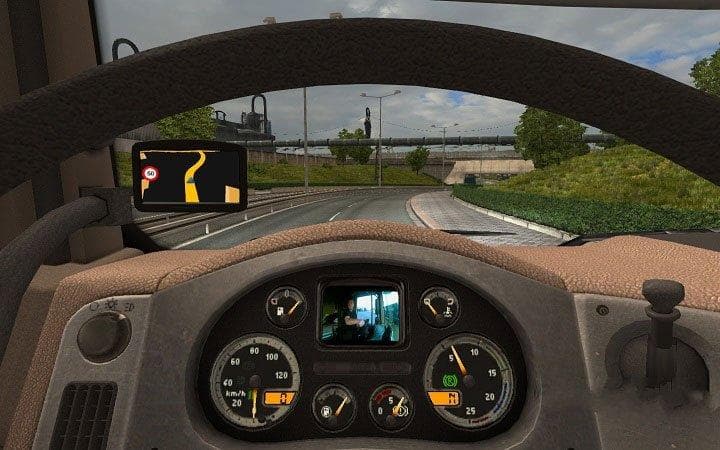
This mod, "DASHBOARD FOR DAF XF 105," version 1.1, adds speed cruise control and video functionality. Created by Euro Truck Simulator 2, it fixes bugs and credi
This mod introduces a dashboard upgrade specifically for the DAF XF 105 truck in Euro Truck Simulator 2. It brings some improvements over the stock dashboard by fixing bugs and adding a speed cruise control feature. Additionally, it incorporates a video function, enhancing the in-cab experience for players who want more interactive elements while driving.
Parts mods like this one typically focus on adding or refining interior and exterior accessories tailored to particular truck models. In this case, the mod enhances the interior setup of the DAF XF 105, letting players customize their truck’s cabin beyond what the base game offers. These upgrades are installed via the truck customization menu where you can swap out parts to fit your personal style or functionality preferences.
When integrating this kind of parts mod into a modded setup, it's good practice to check compatibility with other interior or dashboard mods. Since it supports ETS2 version 1.1, users should ensure their game version matches or is compatible with this mod to avoid any conflicts or unexpected behavior in-game. Load order can be important if multiple mods affect the same truck part.
Players who enjoy fine-tuning their trucks and value small but useful additions like cruise control will find this dashboard mod worthwhile. It fits nicely for those who focus on realism and prefer having more control features accessible right from their cab instruments.
Since the creator is unknown and details like file size are not provided, it’s advisable to test this mod in a controlled environment before fully integrating it into your main profile. This helps prevent potential issues that might arise when combining several mods that alter truck interiors.
How to install
1. Download the file(s) from the original source linked above. 2. Drop them into `Documents/Euro Truck Simulator 2/mod/`. 3. Enable in Mod Manager and restart the game.
After the mod loads, save your game inside a safe area (parking lot or service) before deciding whether to keep it. If the game refuses to load with the mod enabled, check that all required DLCs are installed and that the supported ETS2 version chips on this page include your installed game patch.
Reviews
No ratings yetNo reviews yet — be the first to rate this mod.





